
Set up Real-Time Updates
When a Salesforce record changes, every Document that displays data from that record updates in real time — for anyone viewing it at that moment. No refresh, no stale numbers in a plan someone opened ten minutes ago.
Folio Docs comes set up out of the box for Account, Contact, Opportunity, and Case. For any other object, an admin configures it with a single invocable action in Flow.
What works out of the box
Real-time updates are automatic via platform events, with no configuration required, on four objects:
- Account
- Contact
- Opportunity
- Case
These four ship with packaged triggers. If your Folio implementation only links Documents to these four objects, you don’t need the invocable action described below.
Most implementations do link Documents to other objects, though, so for those objects the Flow setup below is what keeps Documents in sync with CRM data in real time.
Even without this setup, a page refresh always shows current data. The components in a Document re-read Salesforce when the page loads. The Flow described below is only required for real-time updates in Documents users are actively viewing.
Extending it to any other object
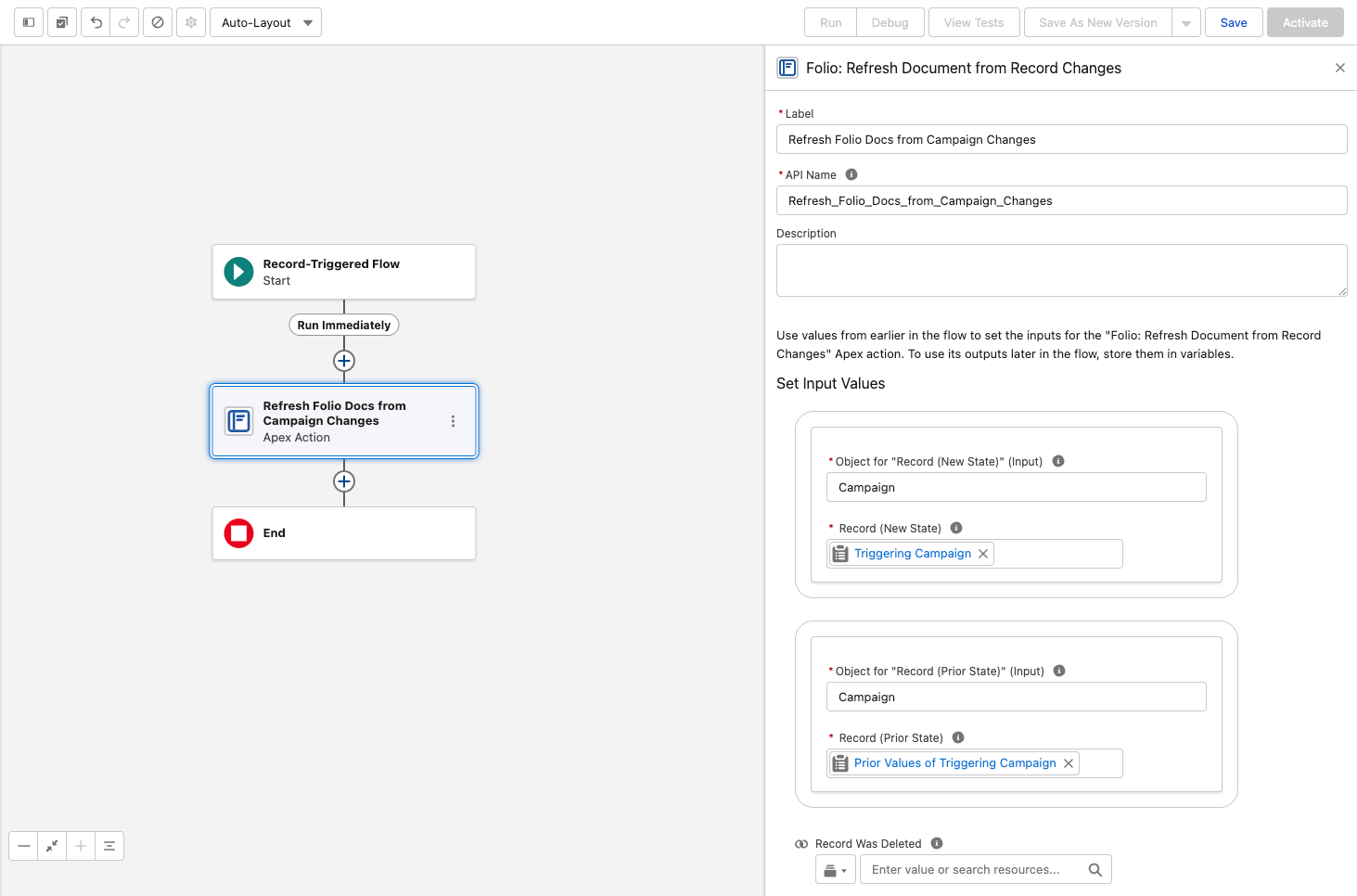
For every other object — custom objects, and standard objects beyond the four above — add an after-save record-triggered Flow using the invocable action Folio: Refresh Document from Record Changes.
To use this invocable action:
- Add it to a Record-Triggered Flow configured for Updated and/or Deleted.
- Map
$Record→ Record (New State). - Map
$Record__Prior→ Record (Prior State). - In a Deleted flow, also set Record Was Deleted = True.
Do not set the trigger to Created or Created and Updated. A new record has no prior state, so Record (Prior State) is empty and the action fails — blocking the save with “Missing required input parameter: recordPrior”. There is nothing to refresh when a record is created: no Document can reference a record that did not exist yet. Updated and Deleted are the only valid trigger settings.
Changed fields are detected automatically — you do not need to specify which fields to watch, and you do not need a separate flow per field.
The action never fails the triggering save. If the refresh cannot complete for any reason, the record update it was triggered by still succeeds. Adding this to a business-critical object’s flow will not put that object’s saves at risk.
What the action does
It pushes the linked record’s state into every Document linked to it. Specifically:
- The record name on direct Record Links
- Field values in Related Lists, Workbenches, Status Bars, Record Previews, and Kanban tiles
- Owner-based sharing, re-run at the object’s configured Auto-Share Level when the record’s owner has changed — including to Queues, where members inherit access automatically (see Queues)
This action is the odd one out among Folio’s invocables. Every other Folio action operates on Documents and their related objects. This one runs on the linked record and updates Documents from it — so it lives in a flow on the object itself, not in a flow about Documents. It’s only ever used on objects other than the four defaults, which already ship with packaged triggers. See Automate with Invocable Apex for the full action reference.
How real-time updates work
Understanding the mechanism helps when you’re deciding which objects deserve a flow.
1 Folio indexes what your Documents display. Whenever a Document contains a Record Link, Live Field, Status Bar, Record Preview, Related List, Kanban, or Workbench, the fields those components display are indexed and tracked.
2 Record changes are filtered against that index. When a record changes, an event publishes only if a changed field matches a tracked field. A record update that touches nothing any Document displays publishes nothing at all.
3 Open Documents update live. Any user viewing that Document at that moment sees the changed values update in the Document body in real time.
Step 2 is what keeps event volume proportional to Folio Docs usage. A high-volume integration updating fields that no Document displays generates no Folio events, so enabling the flow broadly is safe — the cost scales with what your Documents actually reference.
The net effect for users is that Salesforce-connected components in a Document always show current data. A Document is never out of date with the record it describes.
Which objects to set up
A reasonable rule: add the flow to any object your users regularly link Documents to. The Documents by Object chart on the Dashboard tells you exactly which those are — it groups record links by object, so anything with meaningful volume there is worth a flow.
Objects you enabled as Linkable Objects but which never appear in that chart can wait.
Related: Use the Admin Panel · Settings · Automate with Invocable Apex · Review Invocable Apex Use Cases · Dashboard
View this page as Markdown — for LLMs and plain-text tools.