# Set up Real-Time Updates
How Folio pushes Salesforce record changes into open Documents in real time, and the Flow action that extends it to any object.
When a Salesforce record changes, every Document that displays data from that record updates in real time — for anyone viewing it at that moment. No refresh, no stale numbers in a plan someone opened ten minutes ago.
Folio Docs comes set up out of the box for **Account**, **Contact**, **Opportunity**, and **Case**. For any other object, an admin configures it with a single invocable action in Flow.
## What works out of the box
Real-time updates are automatic via platform events, with no configuration required, on four objects:
- **Account**
- **Contact**
- **Opportunity**
- **Case**
These four ship with packaged triggers. If your Folio implementation only links Documents to these four objects, you don't need the invocable action described below.
Most implementations *do* link Documents to other objects, though, so for those objects the Flow setup below is what keeps Documents in sync with CRM data in real time.
**Even without this setup, a page refresh always shows current data.** The components in a Document re-read Salesforce when the page loads. The Flow described below is only required for **real-time** updates in Documents users are actively viewing.
## Extending it to any other object
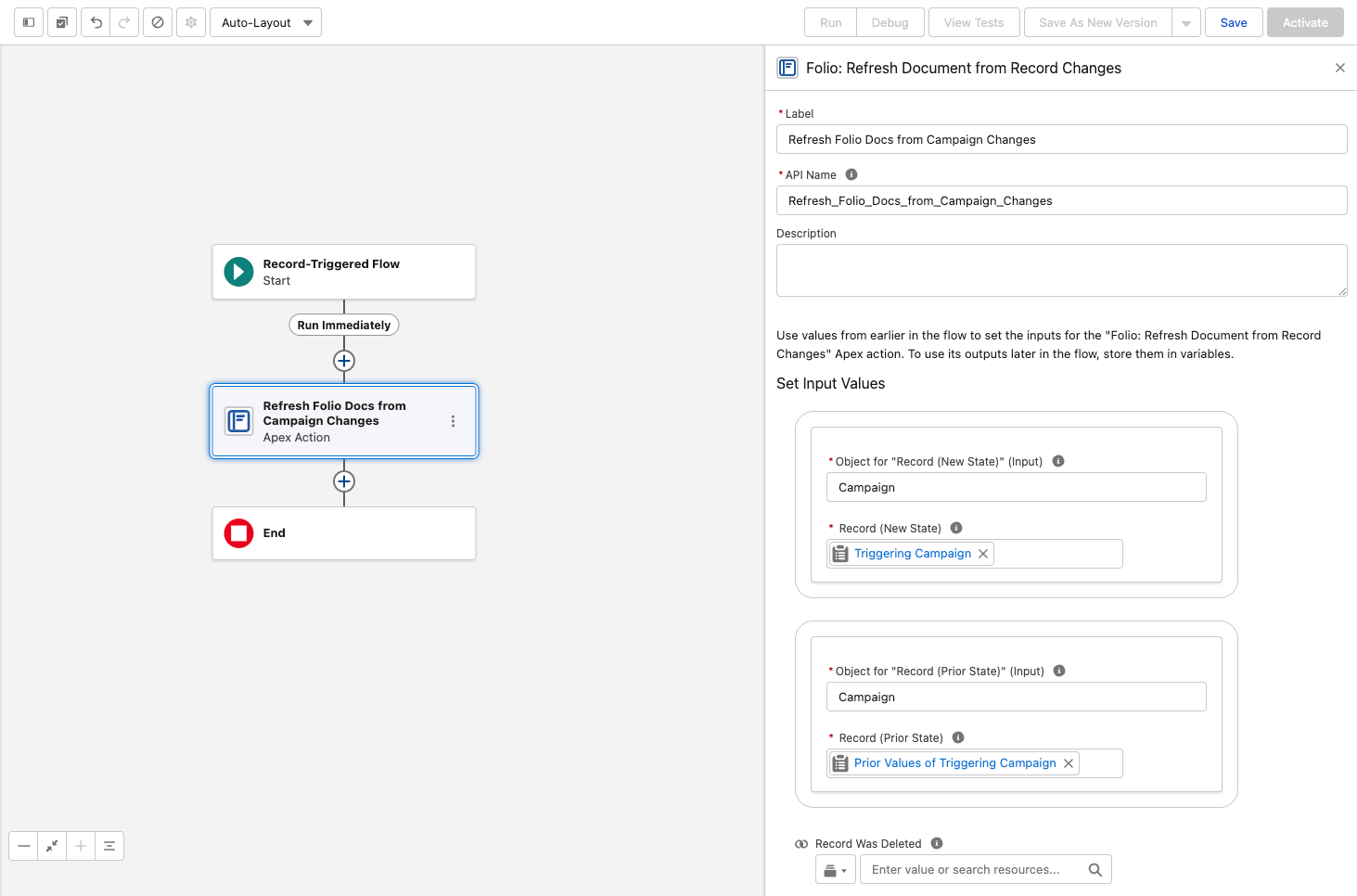
For every other object — custom objects, and standard objects beyond the four above — add an **after-save record-triggered Flow** using the invocable action **Folio: Refresh Document from Record Changes**.
To use this invocable action:
1. Add it to a **Record-Triggered Flow** configured for **Updated** and/or **Deleted**.
2. Map `$Record` → **Record (New State)**.
3. Map `$Record__Prior` → **Record (Prior State)**.
4. In a **Deleted** flow, also set **Record Was Deleted = True**.
> **Do not set the trigger to *Created* or *Created and Updated*.** A new record has no prior state, so **Record (Prior State)** is empty and the action fails — blocking the save with *"Missing required input parameter: recordPrior"*. There is nothing to refresh when a record is created: no Document can reference a record that did not exist yet. **Updated** and **Deleted** are the only valid trigger settings.
Changed fields are detected automatically — you do not need to specify which fields to watch, and you do not need a separate flow per field.
**The action never fails the triggering save.** If the refresh cannot complete for any reason, the record update it was triggered by still succeeds. Adding this to a business-critical object's flow will not put that object's saves at risk.
 ### What the action does
It pushes the linked record's state into every Document linked to it. Specifically:
- **The record name** on direct [Record Links](/docs/user-guide/at-commands#record-links)
- **Field values** in **Related Lists**, **Workbenches**, **Status Bars**, **Record Previews**, and **Kanban** tiles
- **Owner-based sharing**, re-run at the object's configured [Auto-Share Level](/docs/admin/admin-panel/settings#choose-linkable-objects) when the record's owner has changed — including to Queues, where members inherit access automatically (see [Queues](/docs/admin/admin-panel/settings#queues))
**This action is the odd one out among Folio's invocables.** Every other Folio action operates *on* Documents and their related objects. This one runs on the **linked record** and updates Documents *from* it — so it lives in a flow on the object itself, not in a flow about Documents. It's only ever used on objects other than the four defaults, which already ship with packaged triggers. See [Automate with Invocable Apex](/docs/admin/automation-invocable-apex#refresh-document-from-record-changes) for the full action reference.
## How real-time updates work
Understanding the mechanism helps when you're deciding which objects deserve a flow.
1 **Folio indexes what your Documents display.** Whenever a Document contains a Record Link, Live Field, Status Bar, Record Preview, Related List, Kanban, or Workbench, the fields those components display are indexed and tracked.
2 **Record changes are filtered against that index.** When a record changes, an event publishes **only if a changed field matches a tracked field**. A record update that touches nothing any Document displays publishes nothing at all.
3 **Open Documents update live.** Any user viewing that Document at that moment sees the changed values update in the Document body in real time.
Step 2 is what keeps event volume proportional to Folio Docs usage. A high-volume integration updating fields that no Document displays generates no Folio events, so enabling the flow broadly is safe — the cost scales with what your Documents actually reference.
The net effect for users is that Salesforce-connected components in a Document always show current data. A Document is never out of date with the record it describes.
## Which objects to set up
A reasonable rule: **add the flow to any object your users regularly link Documents to.** The [Documents by Object](/docs/admin/admin-panel/dashboard#documents-by-object) chart on the Dashboard tells you exactly which those are — it groups record links by object, so anything with meaningful volume there is worth a flow.
Objects you enabled as [Linkable Objects](/docs/admin/admin-panel/settings#choose-linkable-objects) but which never appear in that chart can wait.
**Related:** [Use the Admin Panel](/docs/admin/admin-panel) · [Settings](/docs/admin/admin-panel/settings) · [Automate with Invocable Apex](/docs/admin/automation-invocable-apex) · [Review Invocable Apex Use Cases](/docs/admin/invocable-apex-use-cases) · [Dashboard](/docs/admin/admin-panel/dashboard)
### What the action does
It pushes the linked record's state into every Document linked to it. Specifically:
- **The record name** on direct [Record Links](/docs/user-guide/at-commands#record-links)
- **Field values** in **Related Lists**, **Workbenches**, **Status Bars**, **Record Previews**, and **Kanban** tiles
- **Owner-based sharing**, re-run at the object's configured [Auto-Share Level](/docs/admin/admin-panel/settings#choose-linkable-objects) when the record's owner has changed — including to Queues, where members inherit access automatically (see [Queues](/docs/admin/admin-panel/settings#queues))
**This action is the odd one out among Folio's invocables.** Every other Folio action operates *on* Documents and their related objects. This one runs on the **linked record** and updates Documents *from* it — so it lives in a flow on the object itself, not in a flow about Documents. It's only ever used on objects other than the four defaults, which already ship with packaged triggers. See [Automate with Invocable Apex](/docs/admin/automation-invocable-apex#refresh-document-from-record-changes) for the full action reference.
## How real-time updates work
Understanding the mechanism helps when you're deciding which objects deserve a flow.
1 **Folio indexes what your Documents display.** Whenever a Document contains a Record Link, Live Field, Status Bar, Record Preview, Related List, Kanban, or Workbench, the fields those components display are indexed and tracked.
2 **Record changes are filtered against that index.** When a record changes, an event publishes **only if a changed field matches a tracked field**. A record update that touches nothing any Document displays publishes nothing at all.
3 **Open Documents update live.** Any user viewing that Document at that moment sees the changed values update in the Document body in real time.
Step 2 is what keeps event volume proportional to Folio Docs usage. A high-volume integration updating fields that no Document displays generates no Folio events, so enabling the flow broadly is safe — the cost scales with what your Documents actually reference.
The net effect for users is that Salesforce-connected components in a Document always show current data. A Document is never out of date with the record it describes.
## Which objects to set up
A reasonable rule: **add the flow to any object your users regularly link Documents to.** The [Documents by Object](/docs/admin/admin-panel/dashboard#documents-by-object) chart on the Dashboard tells you exactly which those are — it groups record links by object, so anything with meaningful volume there is worth a flow.
Objects you enabled as [Linkable Objects](/docs/admin/admin-panel/settings#choose-linkable-objects) but which never appear in that chart can wait.
**Related:** [Use the Admin Panel](/docs/admin/admin-panel) · [Settings](/docs/admin/admin-panel/settings) · [Automate with Invocable Apex](/docs/admin/automation-invocable-apex) · [Review Invocable Apex Use Cases](/docs/admin/invocable-apex-use-cases) · [Dashboard](/docs/admin/admin-panel/dashboard)