
Automate with Invocable Apex
Folio exposes a set of Invocable Apex actions that you can call from Salesforce Flow (and any compatible automation framework) without writing code. These actions let admins query, create, clone, share, Tag, link, transfer, and delete Documents based on real-time business events in Salesforce — so document workflows stay in sync with the records and people they describe.
How to use Folio invocable actions in Flow Builder
- Open Flow Builder and create or edit a flow.
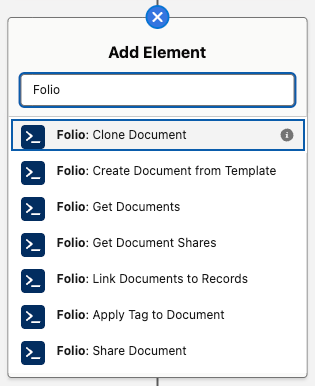
- Add an Action element.
- Search for Folio to list all available invocable actions.
- Select the action you want, then map the inputs (record IDs, template ID, Tag name, etc.) to your flow variables.
- Capture outputs (such as the new Document Id) into flow variables for downstream use.
Every action reports failures the same way: it raises, and you read the message from
{!$Flow.FaultMessage}on a Flow fault path. No action has anerrorMessageoutput. See Handle Invocable Apex Errors for the full pattern.
A note on the success output. Eight actions expose a success Boolean, and it is only ever true — a Decision on success = false is unreachable, because failure raises and takes the fault path rather than returning. It exists for a technical reason: Salesforce requires a return-type class to declare at least one @InvocableVariable, and an empty one won’t compile. The three Get * actions don’t expose it at all; their outputs are the ID collections only.
Folio invocable actions execute in whichever security context the calling flow is configured to run in. By default, that’s the running user of the transaction that triggered the flow — actions then respect the user’s Salesforce object-, record-, and field-level access and will never grant access they don’t already have. If the calling flow is configured to run in system context, Folio invocable actions inherit that system-level access too. Admins are responsible for choosing the flow configuration that matches their org’s security preferences.
Quick reference
Folio ships 11 invocable actions. Ten of them operate on Documents; one runs on a linked record and updates Documents from it.
- Get actions — query Folio data so you can branch logic, populate downstream inputs, or audit access. Three actions: Get Documents, Get Document Junctions, and Get Document Shares.
- Create, update, or delete Document actions — produce, reassign, or remove Documents. Four actions: Clone Document, Create Document from Template, Transfer Document to Owner, and Delete Document.
- Linking actions — connect existing Documents to users, groups, Tags, or records. Three actions: Share Document, Apply Tag to Document, and Link Documents to Records.
- Record-side action — the one action that runs on a linked record rather than on Documents: Refresh Document from Record Changes.
The table below lists every action with its exact Flow label and what it does.
| Flow label | What it does |
|---|---|
| Folio: Get Documents | Retrieves Documents by Tags, linked records, owners, and/or title. Multiple inputs are additive (AND). |
| Folio: Get Document Junctions | Retrieves Junctions (record links and Tags) by type, Document, Tag name, or linked record. Additive (AND). |
| Folio: Get Document Shares | Retrieves folio__Document__Share records by user, Document, and/or access level (Read or Edit). Additive (AND). |
| Folio: Clone Document | Clones one or many Documents; each clone’s title becomes “Copy of” the original. Optional inputs copy Tags, Document Shares, and linked records onto the clones, and assign a new owner. |
| Folio: Create Document from Template | Creates a Document per source record, with merge fields filled from that record. Only Active Templates can be used. Requires the Template ID. |
| Folio: Transfer Document to Owner | Reassigns Documents to a new owner — a User or a Queue; optionally grants the prior owner Read or Edit. A User owner must be active and hold a Folio permission set — Folio Docs User or Folio Docs Administrator. |
| Folio: Delete Document | Deletes Documents together with their record links and Tags, or archives them when Allow Document Hard Delete is off. |
| Folio: Share Document | Shares Documents with Users, Queues, and/or Public Groups at Read or Edit. Additive; never downgrades existing access. |
| Folio: Apply Tag to Document | Applies Tags to Documents; existing Tags are matched by name and reused, otherwise a new Tag is inserted and linked. Already-applied Tags are skipped. |
| Folio: Link Documents to Records | Creates Junctions linking each Document to each given record. Existing links are skipped. |
| Folio: Refresh Document from Record Changes | Pushes a changed record’s values into every Document linked to it, and re-applies owner-based sharing. See Set up Real-Time Updates. |
Core concepts and data model
Before composing flows with these actions, it helps to understand the underlying objects and conventions.
folio__Document__c— the parent record for a Folio Document. Carriesfolio__Is_Archived__candfolio__Document_Type__c(a picklist of Document or Template), which the Get actions use to exclude archived items and templates.folio__Junction__c— the Junction object that links a Document either to a Salesforce record or to a Tag — never both on the same Junction. Created by Link Documents to Records, Apply Tag to Document, and Create Document from Template; queried by Get Document Junctions. See Update Data in Bulk for the field-level detail.folio__Tag__c— a Folio Tag record. Apply Tag to Document reuses Tags by normalized name and creates new ones when needed.folio__Document__Share— the standard Salesforce share object forfolio__Document__c. Read by Get Document Shares, written by Share Document, and managed implicitly by Transfer Document to Owner and Refresh Document from Record Changes.
Text Collections vs Record Collections
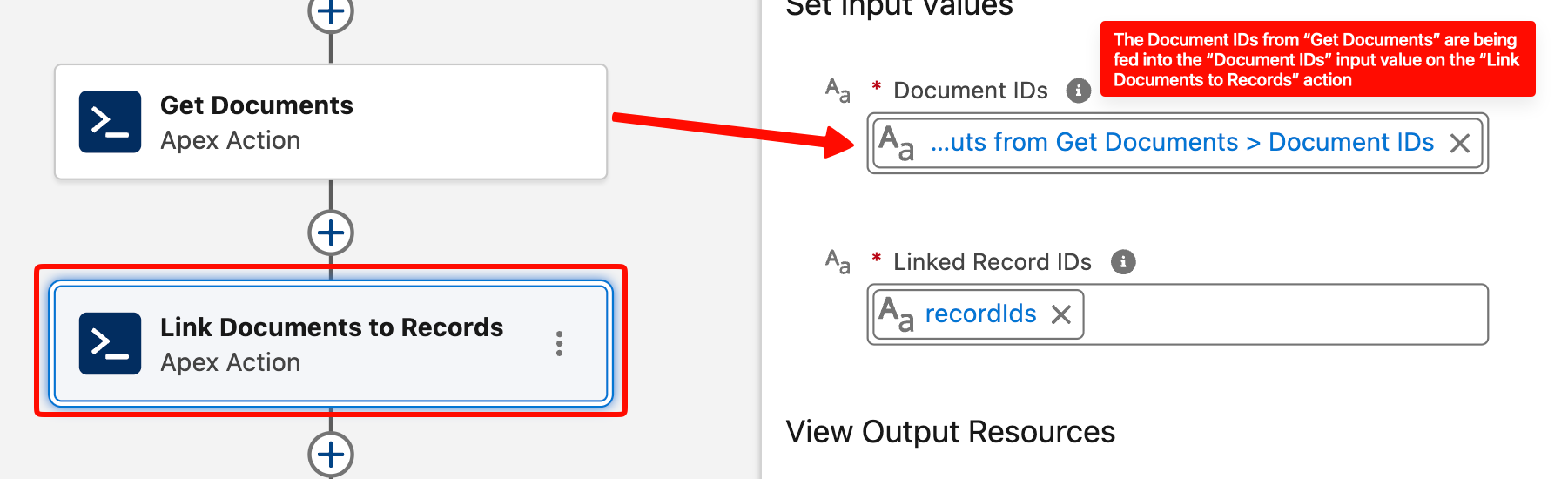
Most Folio actions accept Text Collections of IDs as inputs — Document IDs, record IDs, user IDs, group IDs. Flow stores Salesforce IDs as text by design, and using text collections lets you pass IDs from any source: a record-collection loop, a Get Records output, another invocable action, or hard-coded constants.
Outputs give you both shapes. Get Documents returns documentIds and documentRecords; Get Document Junctions returns junctionIds and junctionRecords; Get Document Shares returns an ID collection and a Record Collection for each of its two owner variants.
Quick rule: use the ID collection when the next step is another Folio action — it chains straight in. Use the Record Collection when you need field values, for a Flow filter, a Loop, or an Update or Delete Records element. Either way, no follow-up Get Records is required.
Bulk-safe by design
The Folio invocables are designed to handle one or many records per transaction with bulk safety in mind. They accept whole collections and process them in a single call — keep them outside Flow Loops and pass the entire collection at once.
Even when you’re acting on a single record, you still have to put that one ID in a Text Collection. The invocables accept Text Collections only. A collection of one is perfectly valid — but a bare Text variable is not, and it will not be accepted. This is the most common point of confusion for Salesforce Administrators using Folio invocable actions, so check it first if an action won’t take your input.
Additive sharing model
Share Document, Transfer Document to Owner (with a non-None priorOwnerAccess), and Refresh Document from Record Changes are all additive. They never downgrade an existing share — if a user already has Edit access, calling Share at Read level will not remove their Edit. This is intentional: invocables won’t silently strip access someone already has.
If you need to remove or downgrade access, do it with standard Flow elements — see Updating and deleting Folio data.
Get actions exclude archived and template Documents
Both Get Documents and Get Document Shares exclude:
- Documents where
folio__Is_Archived__c = true - Documents where
folio__Document_Type__c = 'Template'
This means automation cannot accidentally pull templates into operational flows, and archived items stay out of the way.
Validation expectations
Folio actions enforce safety checks before performing writes:
- Active users only — share/transfer targets must be active Salesforce users holding a Folio permission set, either Folio Docs User or Folio Docs Administrator (see Enabled Folio Docs users).
- Users, Queues, and Public Groups — IDs passed to Share Document may be User IDs, Queue IDs, or Public Group IDs. Role groups and territory groups are not valid targets. A Queue must list Folio Document among its supported objects to be shared with — see Queues.
- Linkable objects — record IDs passed to Link Documents to Records must be of object types configured as Linkable Objects in the Admin Panel.
- Template / source compatibility — Create Document from Template validates that each
sourceRecordIdsentry’s object type is supported by the chosen template’s Source Object configuration. - Sharing/FLS context — Get actions run in the running user’s context, so users only see Documents they already have access to, unless the calling flow is configured to run in system context.
Invocable actions in detail
Each action below has its own reference section covering what it does, its inputs and outputs, and its behavior. Use these as a lookup for the action you need.
Get Documents
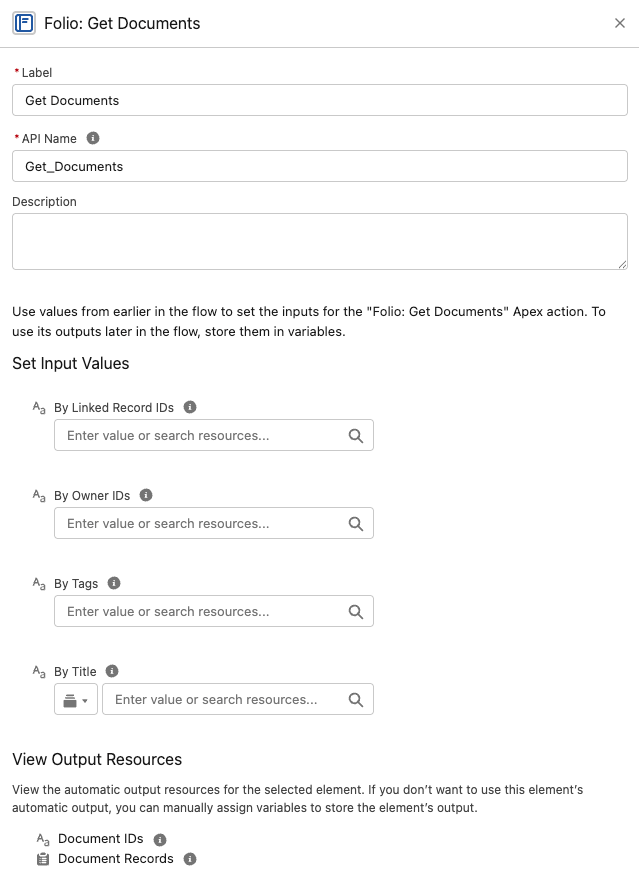
Query Documents by one or more filter dimensions. Filters are AND-combined, and empty/null inputs are ignored. If every filter is empty, the action returns an empty result rather than every Document in the org.
Inputs
byTags(Text Collection) — Document Tag names to match. Case-insensitive.byParentRecordIds(Text Collection) — IDs of records the Documents are linked to (viafolio__Junction__c).byOwnerIds(Text Collection of User IDs) — Document owners to match.byTitle(Text) — Title match using a SOQLLIKEoperator:folio__Title__c LIKE '%<entered value>%'. Matches any Document whose title contains the value as a substring (case-insensitive per SOQLLIKEsemantics).
Outputs
documentIds(Text Collection)documentRecords(Record Collection offolio__Document__c)
Behavior notes
- Excludes archived and template Documents.
- Runs in the user’s sharing/FLS context — won’t return Documents the running user can’t already see.
documentIdsfeeds straight into any other action’sdocumentIdsinput. When you need field values —folio__Title__c,OwnerId,CreatedDate— takedocumentRecordsinstead of following with a separate Get Records.
Get Document Junctions
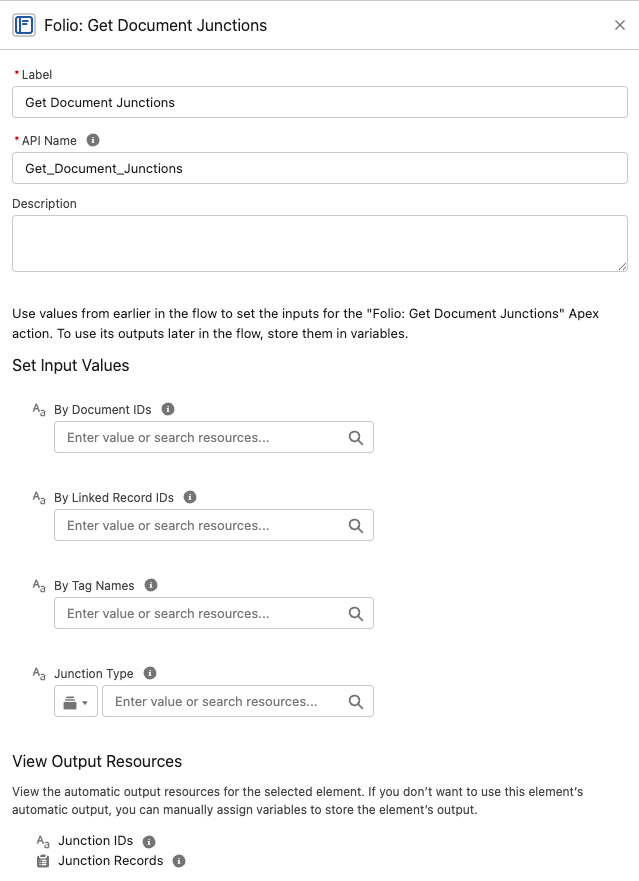
Retrieve Junction records — both record links and Tag links — so a flow can inspect what a Document is connected to before acting on it.
Inputs
junctionType(Text) — restrict to record links or Tag links.byDocumentIds(Text Collection)byTagNames(Text Collection)byLinkedRecordIds(Text Collection) — linked Salesforce record IDs.
Outputs
junctionIds(Text Collection)junctionRecords(Record Collection offolio__Junction__c)
Behavior notes
- Filters are additive (AND-combined). Empty inputs are ignored.
- Take
junctionRecordsto read or report on the Junctions, andjunctionIdswhen you only need to count them or pass IDs along. - A Junction is either a record link or a Tag link, never both —
junctionTypeis the cleanest way to get just one kind. See Update Data in Bulk for the underlying fields. - This is the action to pair with a standard Flow Delete Records element when you need to unlink a Tag or a record from a Document — feed it
junctionRecords. See Updating and deleting Folio data.
Get Document Shares
Look up existing folio__Document__Share rows by user, by Document, by access level, or any combination.
Inputs
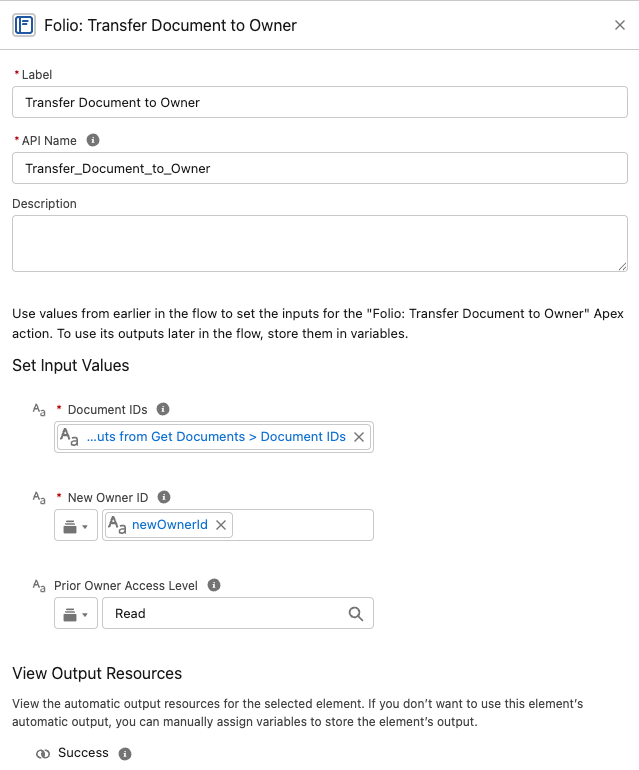
byUserIds(Text Collection)byDocumentIds(Text Collection)byAccessLevel(Text) —ReadorEdit
Outputs — four of them, split two ways
| Output | Contains |
|---|---|
documentShareIdsNoOwners | ID collection, owner rows excluded |
documentShareRecordsNoOwners | Record collection, owner rows excluded |
documentShareIdsWithOwners | ID collection, owner rows included |
documentShareRecordsWithOwners | Record collection, owner rows included |
Pick the right output. With Owners returns every matching share row including the owner’s — use it for auditing and reporting. No Owners excludes rows whose RowCause is Owner — use it for anything that changes access, because owner share records cannot be edited or deleted by anyone. Most of the time, No Owners is the one you want.
Within each pair, use the record collection when feeding a Flow filter or an Update Records element, and the ID collection when you only need to count or pass IDs along.
Behavior notes
- Filters are AND-combined; if all are empty, returns empty.
- Excludes shares pointing at archived or template Documents.
Clone Document
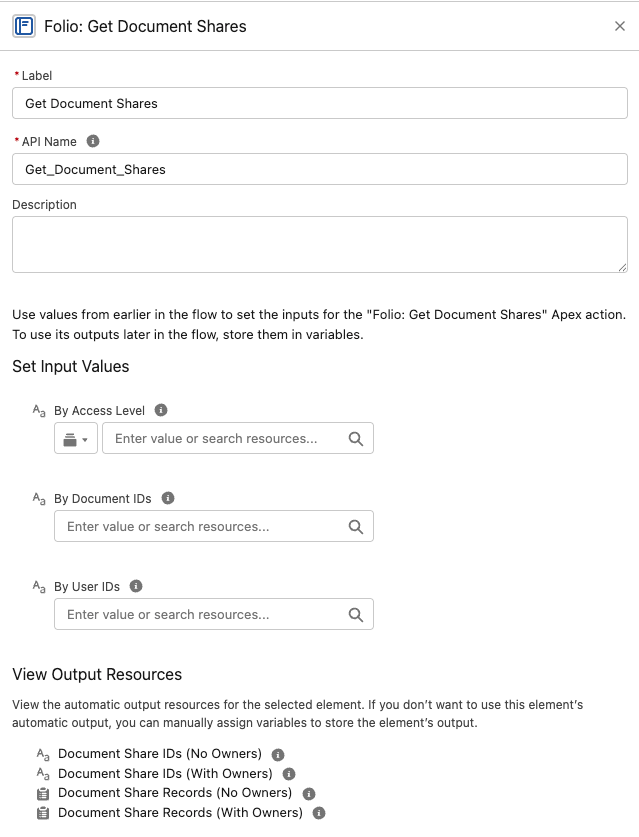
Create independent copies of one or more Documents, with optional carry-over of Tags, sharing, and linked records.
Every optional input defaults to
False. A bare Clone Document call copies the Document’s content only — no Tags, no shares, no record links. This is the most common surprise with this action: admins expect a clone to be a full duplicate and get a bare copy instead. Set the flags you actually want.
Inputs
- Source Document IDs —
sourceDocumentIds(Text Collection, required). - Clone Tags —
cloneTags(Boolean) — copies the source’s Tags onto the clone. DefaultFalse. - Clone Sharing —
cloneSharing(Boolean) — copies Folio-created shares and native manual shares, each keeping its access level. Owner and sharing-rule shares are not copied — the platform recreates those for the clone automatically. DefaultFalse. - Clone Relationships —
cloneRelationships(Boolean) — copies the source’s linked records onto the clone. DefaultFalse. - New Owner ID —
newOwnerId(Text, optional) — a single User ID; every clone gets this owner. If blank, each clone inherits its source Document’s owner. The user must be active and hold a Folio permission set — Folio Docs User or Folio Docs Administrator.
Outputs
success(Boolean) — only evertrue; failures raise insteadnewDocumentIds(Text Collection)
Behavior notes
- Clones are titled
Copy of {original title}. - If more than one ID is passed in
sourceDocumentIds, each source Document gets its own clone created in the same invocable run. newDocumentIdscomes back in the same order as thesourceDocumentIdsinput. That positional guarantee is what makes this action chainable — you can correlate each clone with the Document it came from by index in a loop.sourceDocumentIdsaccepts thedocumentIdsoutput of Folio: Get Documents directly, with no transformation step in between. It’s the most natural pairing in Flow; see Get Documents, then Clone them.- A
newOwnerIdassignment applies to all clones created in that invocable instance — this action does not support different owners for different clones in a single call. - Source IDs and
newOwnerIdare validated; invalid inputs raise an error, so read the message from{!$Flow.FaultMessage}on a fault path. - This action does not instantiate from a template — for that, use Create Document from Template.
Create Document from Template
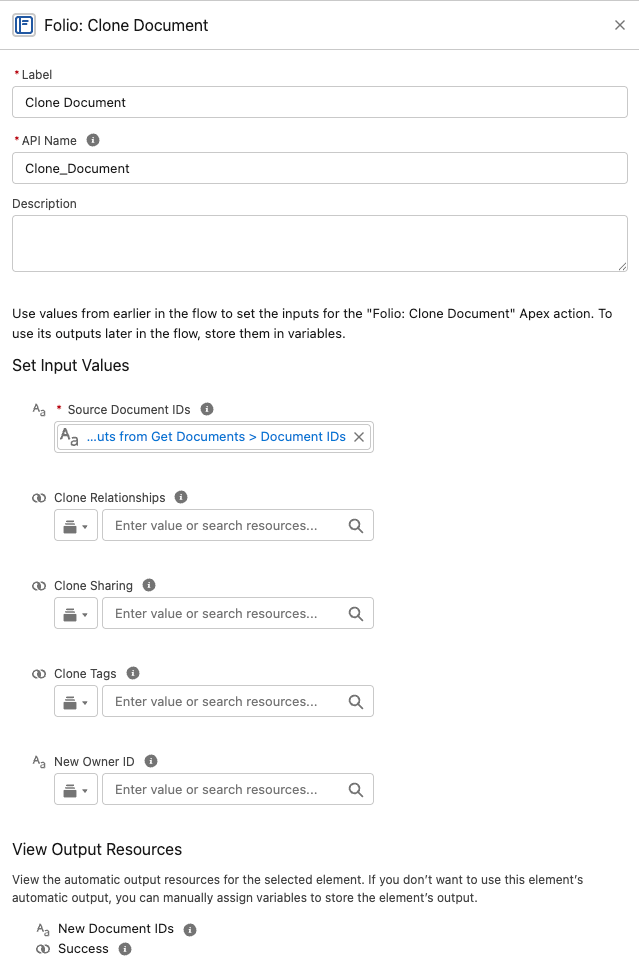
Instantiate one new Document per source record from a chosen template.
Inputs
sourceRecordIds(Text Collection, required)templateId(Text, required)newOwnerId(Text, optional)
Outputs
success(Boolean) — only evertrue; failures raise insteadnewDocumentIds(Text Collection)
Behavior notes
- Resolves merge placeholders (Record Links, Live Fields, Salesforce components) against each source record at instantiation. See Manage Templates for the full merge-syntax walkthrough.
- Validates that each source record’s object type matches the template’s configured Source Object.
- Optionally assign the new Document to a specific
newOwnerId. Defaults to the Owner of the Source Record. Each Document created in an invocable run assigns to the samenewOwnerIdif entered. - Updates the new owner’s Last Viewed tracker so the Documents surface naturally for them on the Folio Docs home page.
- Related records and Tags on the Template carry over to each new Document and arrive locked, exactly as they do when a user instantiates the Template in the editor. See Related Records and Tags on a Template.
Transfer Document to Owner
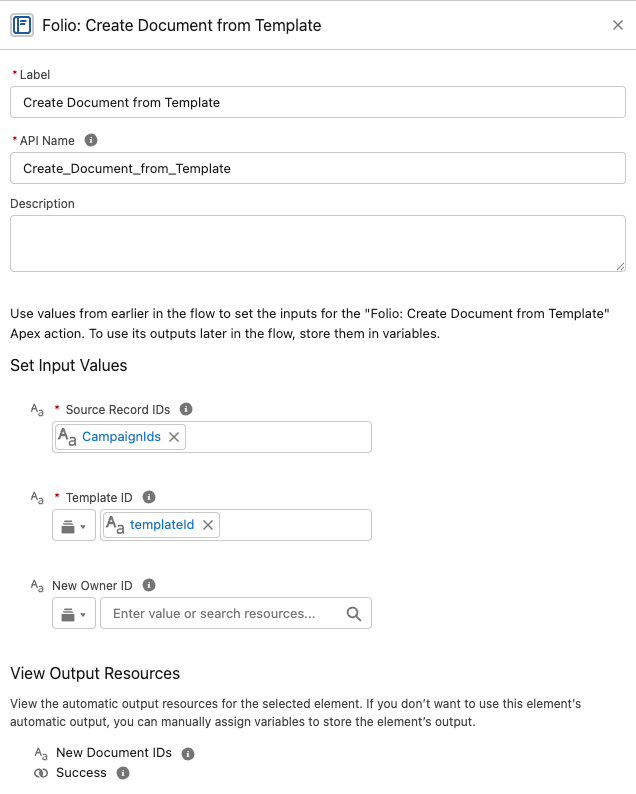
Bulk reassign Document ownership to a single new owner — a User or a Queue — optionally retaining access for prior owners.
Inputs
documentIds(Text Collection, required)newOwnerId(Text, required) — a User ID or a Queue ID.priorOwnerAccess(Text, optional) —None(default),Read, orEdit.
Outputs
success(Boolean) — only evertrue; failures raise instead
Behavior notes
- All input Documents are transferred to the same
newOwnerId. - When
priorOwnerAccessisReadorEdit, the prior owner is added as a manual share at that level. - A User given as
newOwnerIdmust be active and be an enabled Folio Docs user — holding either Folio Docs User or Folio Docs Administrator. A departed or unlicensed user fails the whole call.priorOwnerAccesscarries no such requirement — retaining access for a now-deactivated prior owner is fine. - A Queue given as
newOwnerIdmust list Folio Document among its supported objects — see Queues. Its members hold the owner’s access for as long as they are in the Queue. - Updates the new owner’s Last Viewed tracker so the Documents surface naturally for them on the Folio Docs home page.
Share Document
Grant Read or Edit access to Users, Queues, and/or Public Groups.
Inputs
documentIds(Text Collection, required)shareWithIds(Text Collection, required) — User IDs, Queue IDs, and/or Public Group IDs.accessLevel(Text, required) —ReadorEdit.
Outputs
success(Boolean) — only evertrue; failures raise instead
Behavior notes
- Additive — never downgrades existing higher access.
- Idempotent — re-sharing with an existing Document share row is skipped, so it’s safe to call repeatedly without creating duplicate or noisy share rows.
- Every user in
shareWithIdsmust be active and be an enabled Folio Docs user — holding either Folio Docs User or Folio Docs Administrator. One stale ID fails the whole call. - Groups must be Public Groups or Queues, not role groups or territory groups. A Queue must list Folio Document among its supported objects — see Queues.
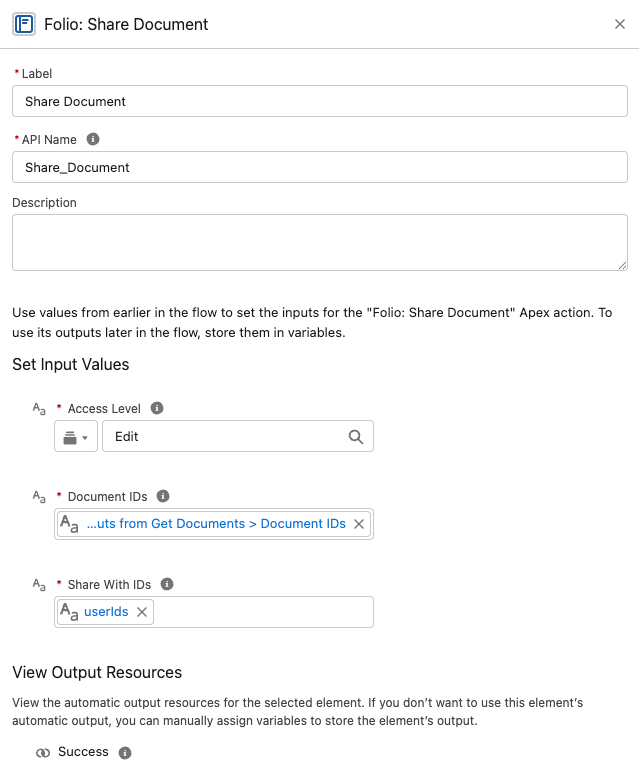
Apply Tag to Document
Apply one or more Tags to one or more Documents.
Inputs
documentIds(Text Collection, required)tagNames(Text, required) — a single comma-separated string, e.g.Priority, Renewal, Q3.
tagNamesis a single Text value, not a Text Collection. This is the one Folio input that breaks the collection convention — pass one comma-separated string rather than a Flow Text Collection. The comma is the separator, so spaces inside a name are part of it:Strategic Account Planis one Tag.
Outputs
success(Boolean) — only evertrue; failures raise instead
Behavior notes
- Tags are matched by normalized name; existing Tags are reused.
- Missing Tags are created on the fly.
- Idempotent — re-running with the same inputs does not apply duplicate Tags to the Document.
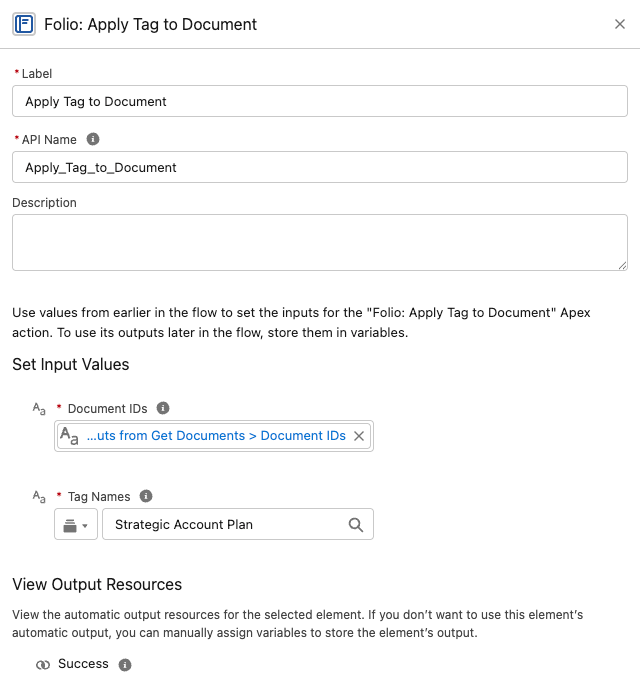
Link Documents to Records
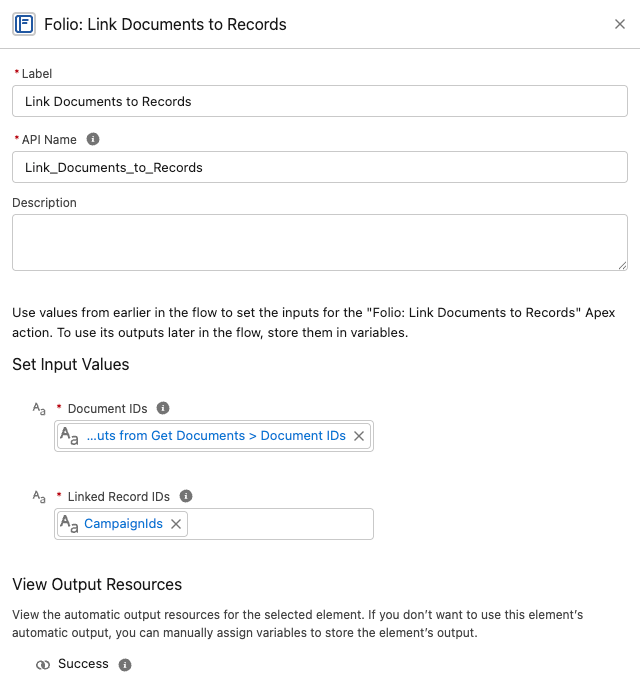
Create Junction links between Documents and any combination of Salesforce records.
Inputs
documentIds(Text Collection, required)recordIds(Text Collection, required) — labeled Linked Record IDs in Flow. IDs of any object configured as a Linkable Object.
Outputs
success(Boolean) — only evertrue; failures raise instead
Behavior notes
- Creates a Junction from every Document in
documentIdsto every record inrecordIds. For example, passing 3 Documents and 2 records produces 6 Junction links (every Document gets linked to every record). - Object types are validated; passing a record whose object isn’t on the Object Linking Allowlist will fail.
- Idempotent — existing links are de-duped, so reruns won’t create duplicates.
Delete Document
Delete Documents together with their record links and Tags — or archive them, depending on your org’s configuration.
Inputs
documentIds(Text Collection, required)
Outputs
success(Boolean) — only evertrue; failures raise insteadarchivedInsteadOfDeleted(Boolean) —truewhen the org’s hard-delete setting caused an archive rather than a delete
Behavior notes
- Honors the Delete Permissions setting. When Allow Document Hard Delete is off — the default and the recommendation — this action sets the Document’s Archived flag instead of deleting the record.
- When hard delete is enabled, the Document is removed along with its Junctions (both record links and Tag links).
- Respects the running user’s access; a user who cannot delete a Document cannot delete it through this action either.
Branch on archivedInsteadOfDeleted to tell the two outcomes apart. Both an archive and a hard delete return success = true, so this Boolean is the only way a flow knows which happened — useful for logging, notifying, or taking a different follow-up step.
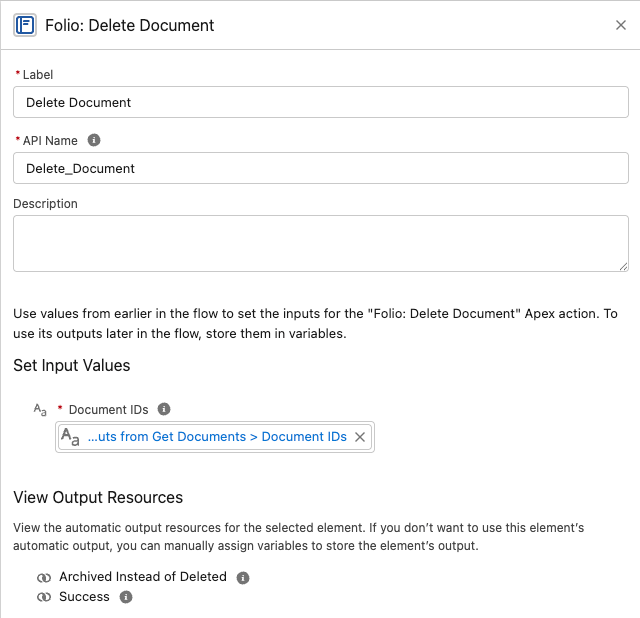
Always delete Documents through this action rather than a raw Flow Delete Records element. See Updating and deleting Folio data for why.
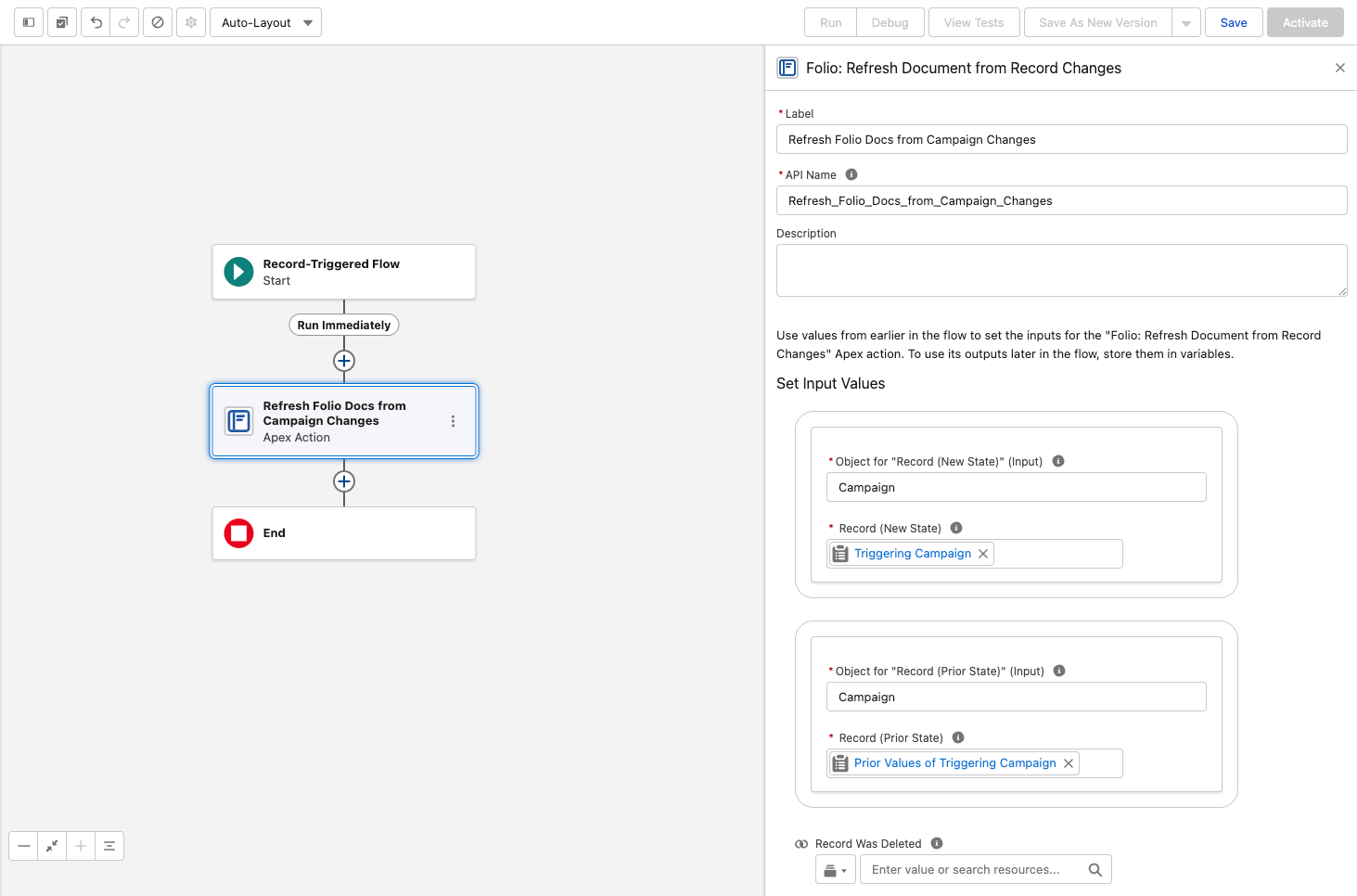
Refresh Document from Record Changes
Pushes a changed Salesforce record’s state into every Document linked to it, and re-applies owner-based sharing.
This is the one Folio invocable that runs on the linked record rather than on Documents, so it belongs in a flow on your Account, Case, or custom object — not in a flow about Documents.
Inputs
- Object for “Record (New State)” and Object for “Record (Prior State)” — the triggering object, e.g.
Campaign. Both are required; Flow needs the object type before it will accept the record variables below. - Record (New State) — map
$Record - Record (Prior State) — map
$Record__Prior - Record Was Deleted (Boolean) — set to
Truein a Deleted flow
Outputs
success(Boolean) — only evertrue; failures raise instead
Behavior notes
-
Add it to an after-save record-triggered Flow configured for Updated and/or Deleted.
-
Never trigger it on record creation. Created and Created and Updated both break it — a brand-new record has no prior state, so Record (Prior State) has nothing to map and the action fails, taking the save with it:
We can’t save this record because the “Custom Object Record Publish to Folio Docs” process failed. Give your Salesforce admin these details. Missing required input parameter: recordPrior
That’s the correct behavior rather than a bug to work around. Refreshing means pushing a change into Documents that already reference the record, and a record that has just been created can’t be referenced anywhere yet. Use Updated and Deleted only.
-
Changed fields are detected automatically — you don’t specify which fields to watch.
-
It never fails the triggering save. If the refresh can’t complete, the record update it was triggered by still succeeds.
-
Updates the record name on Record Links, and field values in Related Lists, Workbenches, Status Bars, Record Previews, and Kanban tiles.
-
Re-applies owner-based sharing at the Auto-Share Level configured for that object when the record’s owner has changed — including to queues, where members inherit access through standard group semantics.
-
Not needed for Account, Contact, Opportunity, or Case — those four ship with packaged triggers and work with no setup.
For the full picture of how real-time updates work and which objects warrant a flow, see Set up Real-Time Updates.
Updating and deleting Folio data
Folio deliberately does not ship invocables for every operation. For updates and deletes, standard Flow elements are the right tool — with two important exceptions.
Document Shares
There is no invocable for updating or deleting Document Shares. Use Folio: Get Document Shares to retrieve the rows you want — take documentShareRecordsNoOwners — then standard Flow Update Records or Delete Records elements to change the access level or revoke access.
Use the No Owners outputs for anything that changes access. Owner share rows exist to represent ownership, are managed by the platform, and cannot be edited or deleted by anyone — including them in an Update or Delete Records element fails the step. The With Owners variants are there for auditing, where you want the complete picture.
Junctions (record links and Tag links)
Use Folio: Get Document Junctions, then standard Flow Update Records or Delete Records elements.
In practice Update is rarely what you want — a Junction is little more than a pair of pointers. Delete is the operation that matters: deleting a Junction effectively unlinks a Tag or a record from the Document.
Documents
Always use Folio: Delete Document. Never use a raw Flow Delete Records element on folio__Document__c.
The invocable removes all linked related records and honors the hard-delete setting, archiving instead of deleting when hard delete is disabled. A raw delete does neither: it orphans the Document’s Junctions — leaving Tag and record links pointing at nothing — and ignores the archive policy entirely, permanently destroying content your org’s configuration says should be recoverable.
If you see a Deleted bar on the Documents Archived or Deleted chart in an org where hard delete is disabled, a raw delete is the likely cause.
For bulk operations outside of Flow, see Update Data in Bulk.
Where to go next
- For chaining recipes (Get → Share, Get → Tag, Clone → Share, etc.) and end-to-end business scenarios, see Review Invocable Apex Use Cases.
- For failure categories, fault-path design, debugging checklists, and idempotency rules, see Handle Invocable Apex Errors.
Best practices and guardrails
- Capture the new Document Id from Create Document from Template or Clone Document so you can chain follow-up actions (apply a Tag, share with a group, link to additional records) in the same flow.
- Combine actions. A single flow can create from a template → apply a Tag → share with a group → link to a related record, all in one run.
- Always supply at least one filter to Get Documents. Returning the entire org is intentionally not allowed — protect your bulkification quotas by being specific.
- Delete Documents only through Folio: Delete Document. A raw Flow Delete Records element orphans Junctions and ignores the archive policy — see Updating and deleting Folio data.
- Use Refresh Document from Record Changes for any object beyond the built-in four. Account, Contact, Opportunity, and Case ship with packaged triggers and need no setup; add a record-triggered flow calling this action to extend the same real-time updates and owner re-sharing to every other object (see Set up Real-Time Updates).
- Tag automatically created Documents (e.g.,
Auto-created,Renewal Draft,Handoff) so users can filter and audit them on the Folio Docs home page. - Set a clear ownership policy before turning on auto-creation — decide who should own auto-created Documents and pass
newOwnerIdaccordingly to avoid orphaned content.
FAQ
Do these actions run in the running user's context, or as a system user?
Whichever context the calling flow is configured for. By default, flows run as the running user, and Folio invocables respect that user’s Salesforce sharing, FLS, and Folio permissions. If the flow is set to system context (with or without sharing), Folio invocables inherit that elevated access. Choose the flow configuration that matches your org’s security model.
What happens if I pass an empty Text Collection?
The action treats it as “no filter” (for Get actions) or as “nothing to do” (for write actions). It is not an error, but downstream Decision nodes should branch on emptiness so the flow logs are explicit.
Can I share with a Salesforce Queue or Role?
A Queue, yes. Pass its ID in shareWithIds alongside any User or Public Group IDs. The Queue must list Folio Document among its supported objects first — see Queues. Queues also receive Documents automatically when they own a linked record and the object’s Auto-Share Level is Read or Edit.
A Role, no. Roles, Role-and-Subordinates groups, and Customer Portal groups are rejected with an error naming the offending group, and a Role cannot receive a share through auto-share either. Use a Public Group instead.
Will Share Document overwrite an existing Edit share with Read?
No — sharing is additive and never downgrades. To remove or downgrade access, use a separate revocation path: call Get Document Shares, take documentShareRecordsNoOwners, and use a standard Flow Update Records element to change AccessLevel (or Delete Records to revoke access entirely). See Updating and deleting Folio data.
How do I share with a Salesforce Account/Opportunity/Case Team?
Use the Automatic Team Sharing settings in the Folio Admin app to automatically share Documents with the Team Members of linked Accounts, Opportunities, and Cases. For any other sharing automation needs, use the Share Document invocable action.
Can Get Documents return archived Documents?
No — both Get actions exclude archived and template Documents by design. To work with archived Documents, use a Get Records element directly on folio__Document__c filtered by folio__Is_Archived__c = true and folio__Document_Type__c = 'Document' (subject to user access). Without the second filter you’ll pull archived templates in alongside archived Documents.
Why do most inputs use Text Collections of IDs instead of Record Collections?
IDs are stored as text in Flow, and Text Collections accept IDs from any source — Get actions, Get Records loops, manually-entered constants. Record Collections are returned where you need field values for downstream decisions.
Does Refresh Document from Record Changes remove the prior owner's access?
No — it is additive. It grants the new owner access at the configured Auto-Share Level but never strips the prior owner’s. If you need to remove the prior owner, do that explicitly via separate logic.
How do I delete or downgrade a Document Share?
There is no invocable for it. Use Get Document Shares, take documentShareRecordsNoOwners, then a standard Flow Update Records or Delete Records element — see Updating and deleting Folio data.
Are Folio invocables bulkified?
Yes — they’re designed to accept collections and process them in bulk. Keep them outside Flow Loops and pass the whole collection in one call. For single-record use, wrap the one record ID in a Text Collection of one and pass that — the inputs only accept Text Collections, but a collection of one is fine.
Where do I find the in-org help text and parameter labels?
Inside Flow Builder, after adding the action element, expand the input/output panels to see the latest authoritative description for each parameter as it ships.
Related: Review Invocable Apex Use Cases · Handle Invocable Apex Errors · Manage Templates · Use the Admin Panel · Set up Real-Time Updates
View this page as Markdown — for LLMs and plain-text tools.