
Add Components to Lightning Pages
Folio’s editor is a Lightning web component placed on Lightning record pages in Lightning App Builder.
Component
- Folio Document Editor: the full Folio Docs editor. Place on object record pages where users should create and read Documents.
Add the component to a record page
- Open a record of the object you’re configuring (or go to Setup → Lightning App Builder).
- Setup → gear icon → Edit Page (or edit the assigned record page from Setup).
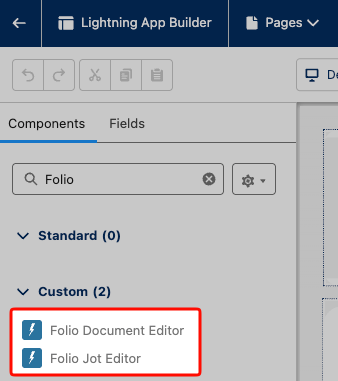
- In the component palette, search Folio.
- Drag Folio Document Editor onto the layout.
- Save and Activate the page (and assign to the right app, profile, or app page assignment as needed).
The component can sit on standard or custom object pages.
Recommended placement and sizing
The Folio Document Editor is best suited in a large segment of the page (the main content column). Adding it to a right-sidebar section will not be very usable. The most common placement is within the main segment of a Lightning page under its own Lightning Tab called “Folio Docs”.
Default height
The Folio Document Editor defaults to a height of 900px, but can be manually edited by admins on the component’s properties in Lightning App Builder.
Recommendation: Put the Folio Document Editor on high-traffic record pages where teams collaborate on long-form content (Account, Opportunity, Case).
Related: Install the Package · Use the Admin Panel
View this page as Markdown — for LLMs and plain-text tools.