# Automate with Invocable Apex
Invocable Apex actions exposed by Folio for use in Salesforce Flow and other declarative automation.
Folio exposes a set of Invocable Apex actions that you can call from Salesforce Flow (and any compatible automation framework) without writing code. These actions let admins query, create, clone, share, Tag, link, transfer, and delete Documents based on real-time business events in Salesforce — so document workflows stay in sync with the records and people they describe.
## How to use Folio invocable actions in Flow Builder
1. Open **Flow Builder** and create or edit a flow.
2. Add an **Action** element.
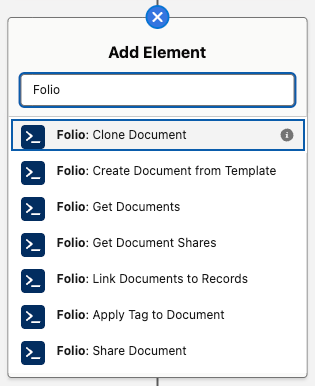
3. Search for **Folio** to list all available invocable actions.
4. Select the action you want, then map the inputs (record IDs, template ID, Tag name, etc.) to your flow variables.
5. Capture outputs (such as the new Document Id) into flow variables for downstream use.
 > **Every action reports failures the same way:** it raises, and you read the message from `{!$Flow.FaultMessage}` on a Flow fault path. **No action has an `errorMessage` output.** See [Handle Invocable Apex Errors](/docs/admin/invocable-apex-errors) for the full pattern.
**A note on the `success` output.** Eight actions expose a `success` Boolean, and **it is only ever `true`** — a Decision on `success = false` is unreachable, because failure raises and takes the fault path rather than returning. It exists for a technical reason: Salesforce requires a return-type class to declare at least one `@InvocableVariable`, and an empty one won't compile. The three `Get *` actions don't expose it at all; their outputs are the ID collections only.
Folio invocable actions execute in whichever security context the calling flow is configured to run in. By default, that's the running user of the transaction that triggered the flow — actions then respect the user's Salesforce object-, record-, and field-level access and will never grant access they don't already have. If the calling flow is configured to run in system context, Folio invocable actions inherit that system-level access too. Admins are responsible for choosing the flow configuration that matches their org's security preferences.
## Quick reference
Folio ships **11 invocable actions**. Ten of them operate on Documents; one runs on a linked record and updates Documents from it.
1. **Get actions** — query Folio data so you can branch logic, populate downstream inputs, or audit access. Three actions: **Get Documents**, **Get Document Junctions**, and **Get Document Shares**.
2. **Create, update, or delete Document actions** — produce, reassign, or remove Documents. Four actions: **Clone Document**, **Create Document from Template**, **Transfer Document to Owner**, and **Delete Document**.
3. **Linking actions** — connect existing Documents to users, groups, Tags, or records. Three actions: **Share Document**, **Apply Tag to Document**, and **Link Documents to Records**.
4. **Record-side action** — the one action that runs on a linked record rather than on Documents: **Refresh Document from Record Changes**.
The table below lists every action with its exact Flow label and what it does.
| Flow label | What it does |
| --- | --- |
| **Folio: Get Documents** | Retrieves Documents by Tags, linked records, owners, and/or title. Multiple inputs are additive (AND). |
| **Folio: Get Document Junctions** | Retrieves Junctions (record links and Tags) by type, Document, Tag name, or linked record. Additive (AND). |
| **Folio: Get Document Shares** | Retrieves `folio__Document__Share` records by user, Document, and/or access level (Read or Edit). Additive (AND). |
| **Folio: Clone Document** | Clones one or many Documents; each clone's title becomes "Copy of" the original. Optional inputs copy Tags, Document Shares, and linked records onto the clones, and assign a new owner. |
| **Folio: Create Document from Template** | Creates a Document per source record, with merge fields filled from that record. Only **Active** Templates can be used. Requires the Template ID. |
| **Folio: Transfer Document to Owner** | Reassigns Documents to a new owner — a User or a Queue; optionally grants the prior owner Read or Edit. A User owner must be active and hold a Folio permission set — **Folio Docs User** or **Folio Docs Administrator**. |
| **Folio: Delete Document** | Deletes Documents together with their record links and Tags, or **archives** them when [Allow Document Hard Delete](/docs/admin/admin-panel/settings#delete-permissions) is off. |
| **Folio: Share Document** | Shares Documents with Users, Queues, and/or Public Groups at Read or Edit. Additive; never downgrades existing access. |
| **Folio: Apply Tag to Document** | Applies Tags to Documents; existing Tags are matched by name and reused, otherwise a new Tag is inserted and linked. Already-applied Tags are skipped. |
| **Folio: Link Documents to Records** | Creates Junctions linking each Document to each given record. Existing links are skipped. |
| **Folio: Refresh Document from Record Changes** | Pushes a changed record's values into every Document linked to it, and re-applies owner-based sharing. See [Set up Real-Time Updates](/docs/admin/real-time-updates). |
## Core concepts and data model
Before composing flows with these actions, it helps to understand the underlying objects and conventions.
- **`folio__Document__c`** — the parent record for a Folio Document. Carries `folio__Is_Archived__c` and `folio__Document_Type__c` (a picklist of **Document** or **Template**), which the Get actions use to exclude archived items and templates.
- **`folio__Junction__c`** — the Junction object that links a Document either to a Salesforce record or to a Tag — never both on the same Junction. Created by **Link Documents to Records**, **Apply Tag to Document**, and **Create Document from Template**; queried by **Get Document Junctions**. See [Update Data in Bulk](/docs/admin/bulk-data-updates#junction-object) for the field-level detail.
- **`folio__Tag__c`** — a Folio Tag record. **Apply Tag to Document** reuses Tags by normalized name and creates new ones when needed.
- **`folio__Document__Share`** — the standard Salesforce share object for `folio__Document__c`. Read by **Get Document Shares**, written by **Share Document**, and managed implicitly by **Transfer Document to Owner** and **Refresh Document from Record Changes**.
### Text Collections vs Record Collections
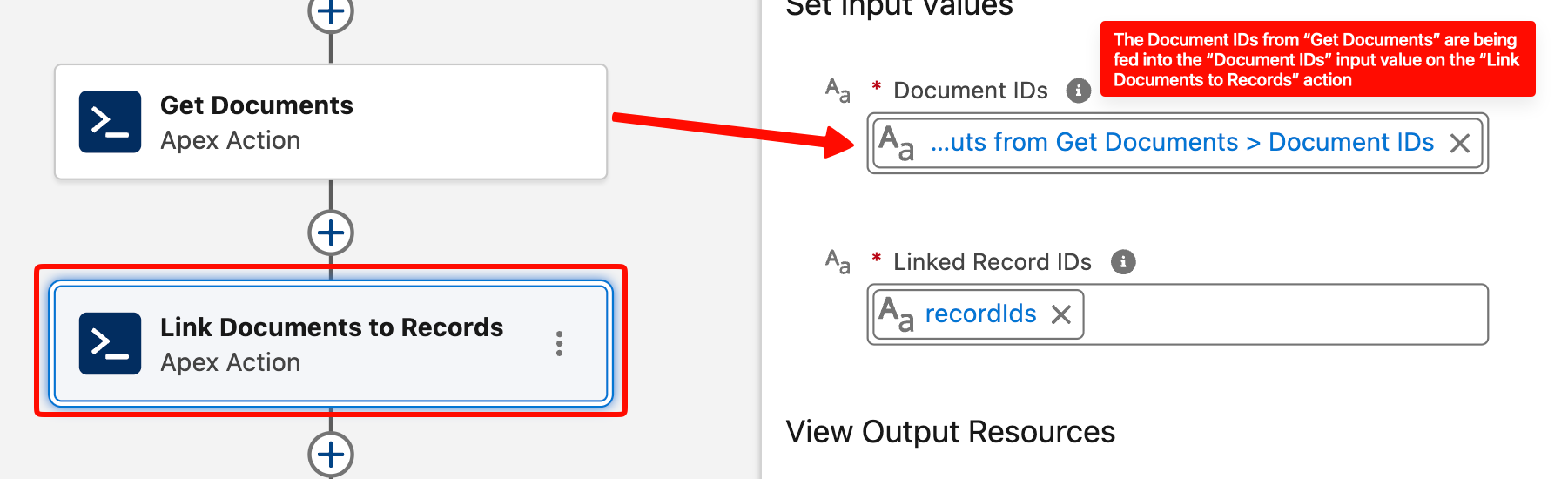
Most Folio actions accept Text Collections of IDs as inputs — Document IDs, record IDs, user IDs, group IDs. Flow stores Salesforce IDs as text by design, and using text collections lets you pass IDs from any source: a record-collection loop, a Get Records output, another invocable action, or hard-coded constants.
Outputs give you both shapes. **Get Documents** returns `documentIds` and `documentRecords`; **Get Document Junctions** returns `junctionIds` and `junctionRecords`; **Get Document Shares** returns an ID collection and a Record Collection for each of its two owner variants.
**Quick rule:** use the ID collection when the next step is another Folio action — it chains straight in. Use the Record Collection when you need field values, for a Flow filter, a Loop, or an Update or Delete Records element. Either way, no follow-up **Get Records** is required.
> **Every action reports failures the same way:** it raises, and you read the message from `{!$Flow.FaultMessage}` on a Flow fault path. **No action has an `errorMessage` output.** See [Handle Invocable Apex Errors](/docs/admin/invocable-apex-errors) for the full pattern.
**A note on the `success` output.** Eight actions expose a `success` Boolean, and **it is only ever `true`** — a Decision on `success = false` is unreachable, because failure raises and takes the fault path rather than returning. It exists for a technical reason: Salesforce requires a return-type class to declare at least one `@InvocableVariable`, and an empty one won't compile. The three `Get *` actions don't expose it at all; their outputs are the ID collections only.
Folio invocable actions execute in whichever security context the calling flow is configured to run in. By default, that's the running user of the transaction that triggered the flow — actions then respect the user's Salesforce object-, record-, and field-level access and will never grant access they don't already have. If the calling flow is configured to run in system context, Folio invocable actions inherit that system-level access too. Admins are responsible for choosing the flow configuration that matches their org's security preferences.
## Quick reference
Folio ships **11 invocable actions**. Ten of them operate on Documents; one runs on a linked record and updates Documents from it.
1. **Get actions** — query Folio data so you can branch logic, populate downstream inputs, or audit access. Three actions: **Get Documents**, **Get Document Junctions**, and **Get Document Shares**.
2. **Create, update, or delete Document actions** — produce, reassign, or remove Documents. Four actions: **Clone Document**, **Create Document from Template**, **Transfer Document to Owner**, and **Delete Document**.
3. **Linking actions** — connect existing Documents to users, groups, Tags, or records. Three actions: **Share Document**, **Apply Tag to Document**, and **Link Documents to Records**.
4. **Record-side action** — the one action that runs on a linked record rather than on Documents: **Refresh Document from Record Changes**.
The table below lists every action with its exact Flow label and what it does.
| Flow label | What it does |
| --- | --- |
| **Folio: Get Documents** | Retrieves Documents by Tags, linked records, owners, and/or title. Multiple inputs are additive (AND). |
| **Folio: Get Document Junctions** | Retrieves Junctions (record links and Tags) by type, Document, Tag name, or linked record. Additive (AND). |
| **Folio: Get Document Shares** | Retrieves `folio__Document__Share` records by user, Document, and/or access level (Read or Edit). Additive (AND). |
| **Folio: Clone Document** | Clones one or many Documents; each clone's title becomes "Copy of" the original. Optional inputs copy Tags, Document Shares, and linked records onto the clones, and assign a new owner. |
| **Folio: Create Document from Template** | Creates a Document per source record, with merge fields filled from that record. Only **Active** Templates can be used. Requires the Template ID. |
| **Folio: Transfer Document to Owner** | Reassigns Documents to a new owner — a User or a Queue; optionally grants the prior owner Read or Edit. A User owner must be active and hold a Folio permission set — **Folio Docs User** or **Folio Docs Administrator**. |
| **Folio: Delete Document** | Deletes Documents together with their record links and Tags, or **archives** them when [Allow Document Hard Delete](/docs/admin/admin-panel/settings#delete-permissions) is off. |
| **Folio: Share Document** | Shares Documents with Users, Queues, and/or Public Groups at Read or Edit. Additive; never downgrades existing access. |
| **Folio: Apply Tag to Document** | Applies Tags to Documents; existing Tags are matched by name and reused, otherwise a new Tag is inserted and linked. Already-applied Tags are skipped. |
| **Folio: Link Documents to Records** | Creates Junctions linking each Document to each given record. Existing links are skipped. |
| **Folio: Refresh Document from Record Changes** | Pushes a changed record's values into every Document linked to it, and re-applies owner-based sharing. See [Set up Real-Time Updates](/docs/admin/real-time-updates). |
## Core concepts and data model
Before composing flows with these actions, it helps to understand the underlying objects and conventions.
- **`folio__Document__c`** — the parent record for a Folio Document. Carries `folio__Is_Archived__c` and `folio__Document_Type__c` (a picklist of **Document** or **Template**), which the Get actions use to exclude archived items and templates.
- **`folio__Junction__c`** — the Junction object that links a Document either to a Salesforce record or to a Tag — never both on the same Junction. Created by **Link Documents to Records**, **Apply Tag to Document**, and **Create Document from Template**; queried by **Get Document Junctions**. See [Update Data in Bulk](/docs/admin/bulk-data-updates#junction-object) for the field-level detail.
- **`folio__Tag__c`** — a Folio Tag record. **Apply Tag to Document** reuses Tags by normalized name and creates new ones when needed.
- **`folio__Document__Share`** — the standard Salesforce share object for `folio__Document__c`. Read by **Get Document Shares**, written by **Share Document**, and managed implicitly by **Transfer Document to Owner** and **Refresh Document from Record Changes**.
### Text Collections vs Record Collections
Most Folio actions accept Text Collections of IDs as inputs — Document IDs, record IDs, user IDs, group IDs. Flow stores Salesforce IDs as text by design, and using text collections lets you pass IDs from any source: a record-collection loop, a Get Records output, another invocable action, or hard-coded constants.
Outputs give you both shapes. **Get Documents** returns `documentIds` and `documentRecords`; **Get Document Junctions** returns `junctionIds` and `junctionRecords`; **Get Document Shares** returns an ID collection and a Record Collection for each of its two owner variants.
**Quick rule:** use the ID collection when the next step is another Folio action — it chains straight in. Use the Record Collection when you need field values, for a Flow filter, a Loop, or an Update or Delete Records element. Either way, no follow-up **Get Records** is required.
 ### Bulk-safe by design
The Folio invocables are designed to handle one or many records per transaction with bulk safety in mind. They accept whole collections and process them in a single call — keep them outside Flow Loops and pass the entire collection at once.
> **Even when you're acting on a single record, you still have to put that one ID in a Text Collection.** The invocables accept Text Collections only. A collection of one is perfectly valid — but a bare Text variable is not, and it will not be accepted. This is the most common point of confusion for Salesforce Administrators using Folio invocable actions, so check it first if an action won't take your input.
### Additive sharing model
**Share Document**, **Transfer Document to Owner** (with a non-`None` `priorOwnerAccess`), and **Refresh Document from Record Changes** are all additive. They never downgrade an existing share — if a user already has Edit access, calling Share at Read level will not remove their Edit. This is intentional: invocables won't silently strip access someone already has.
If you need to remove or downgrade access, do it with standard Flow elements — see [Updating and deleting Folio data](#updating-and-deleting-folio-data).
### Get actions exclude archived and template Documents
Both **Get Documents** and **Get Document Shares** exclude:
- Documents where `folio__Is_Archived__c = true`
- Documents where `folio__Document_Type__c = 'Template'`
This means automation cannot accidentally pull templates into operational flows, and archived items stay out of the way.
### Validation expectations
Folio actions enforce safety checks before performing writes:
- **Active users only** — share/transfer targets must be active Salesforce users holding a Folio permission set, either **Folio Docs User** or **Folio Docs Administrator** (see [Enabled Folio Docs users](/docs/getting-started/licenses-and-permissions#enabled-folio-docs-users)).
- **Users, Queues, and Public Groups** — IDs passed to **Share Document** may be User IDs, Queue IDs, or Public Group IDs. Role groups and territory groups are not valid targets. A Queue must list **Folio Document** among its supported objects to be shared with — see [Queues](/docs/admin/admin-panel/settings#queues).
- **Linkable objects** — record IDs passed to **Link Documents to Records** must be of object types configured as Linkable Objects in the [Admin Panel](/docs/admin/admin-panel).
- **Template / source compatibility** — **Create Document from Template** validates that each `sourceRecordIds` entry's object type is supported by the chosen template's Source Object configuration.
- **Sharing/FLS context** — Get actions run in the running user's context, so users only see Documents they already have access to, unless the calling flow is configured to run in system context.
## Invocable actions in detail
Each action below has its own reference section covering what it does, its inputs and outputs, and its behavior. Use these as a lookup for the action you need.
### Get Documents
Query Documents by one or more filter dimensions. Filters are AND-combined, and empty/null inputs are ignored. If every filter is empty, the action returns an empty result rather than every Document in the org.
**Inputs**
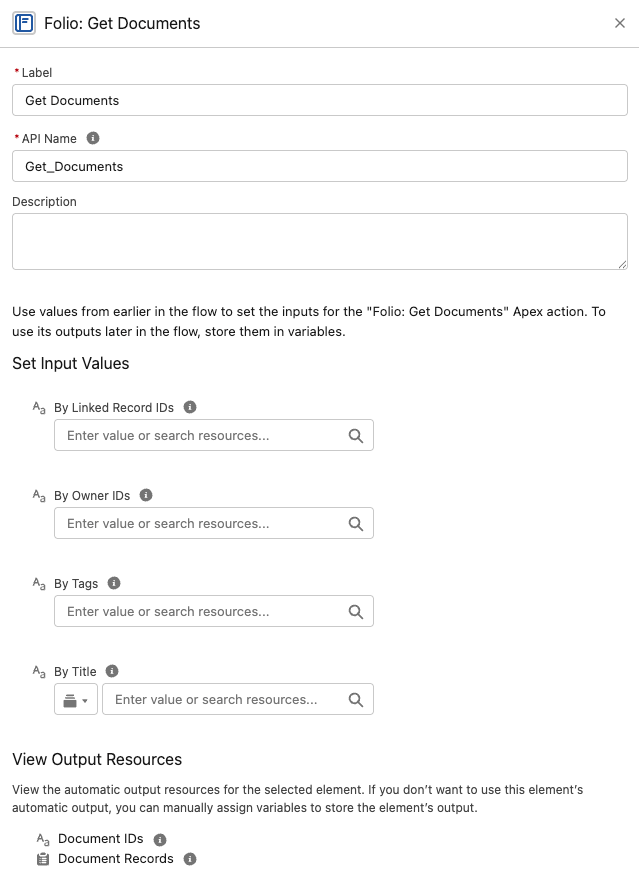
- `byTags` (Text Collection) — Document Tag names to match. Case-insensitive.
- `byParentRecordIds` (Text Collection) — IDs of records the Documents are linked to (via `folio__Junction__c`).
- `byOwnerIds` (Text Collection of User IDs) — Document owners to match.
- `byTitle` (Text) — Title match using a SOQL `LIKE` operator: `folio__Title__c LIKE '%%'`. Matches any Document whose title contains the value as a substring (case-insensitive per SOQL `LIKE` semantics).
**Outputs**
- `documentIds` (Text Collection)
- `documentRecords` (Record Collection of `folio__Document__c`)
**Behavior notes**
- Excludes archived and template Documents.
- Runs in the user's sharing/FLS context — won't return Documents the running user can't already see.
- `documentIds` feeds straight into any other action's `documentIds` input. **When you need field values** — `folio__Title__c`, `OwnerId`, `CreatedDate` — take `documentRecords` instead of following with a separate **Get Records**.
### Bulk-safe by design
The Folio invocables are designed to handle one or many records per transaction with bulk safety in mind. They accept whole collections and process them in a single call — keep them outside Flow Loops and pass the entire collection at once.
> **Even when you're acting on a single record, you still have to put that one ID in a Text Collection.** The invocables accept Text Collections only. A collection of one is perfectly valid — but a bare Text variable is not, and it will not be accepted. This is the most common point of confusion for Salesforce Administrators using Folio invocable actions, so check it first if an action won't take your input.
### Additive sharing model
**Share Document**, **Transfer Document to Owner** (with a non-`None` `priorOwnerAccess`), and **Refresh Document from Record Changes** are all additive. They never downgrade an existing share — if a user already has Edit access, calling Share at Read level will not remove their Edit. This is intentional: invocables won't silently strip access someone already has.
If you need to remove or downgrade access, do it with standard Flow elements — see [Updating and deleting Folio data](#updating-and-deleting-folio-data).
### Get actions exclude archived and template Documents
Both **Get Documents** and **Get Document Shares** exclude:
- Documents where `folio__Is_Archived__c = true`
- Documents where `folio__Document_Type__c = 'Template'`
This means automation cannot accidentally pull templates into operational flows, and archived items stay out of the way.
### Validation expectations
Folio actions enforce safety checks before performing writes:
- **Active users only** — share/transfer targets must be active Salesforce users holding a Folio permission set, either **Folio Docs User** or **Folio Docs Administrator** (see [Enabled Folio Docs users](/docs/getting-started/licenses-and-permissions#enabled-folio-docs-users)).
- **Users, Queues, and Public Groups** — IDs passed to **Share Document** may be User IDs, Queue IDs, or Public Group IDs. Role groups and territory groups are not valid targets. A Queue must list **Folio Document** among its supported objects to be shared with — see [Queues](/docs/admin/admin-panel/settings#queues).
- **Linkable objects** — record IDs passed to **Link Documents to Records** must be of object types configured as Linkable Objects in the [Admin Panel](/docs/admin/admin-panel).
- **Template / source compatibility** — **Create Document from Template** validates that each `sourceRecordIds` entry's object type is supported by the chosen template's Source Object configuration.
- **Sharing/FLS context** — Get actions run in the running user's context, so users only see Documents they already have access to, unless the calling flow is configured to run in system context.
## Invocable actions in detail
Each action below has its own reference section covering what it does, its inputs and outputs, and its behavior. Use these as a lookup for the action you need.
### Get Documents
Query Documents by one or more filter dimensions. Filters are AND-combined, and empty/null inputs are ignored. If every filter is empty, the action returns an empty result rather than every Document in the org.
**Inputs**
- `byTags` (Text Collection) — Document Tag names to match. Case-insensitive.
- `byParentRecordIds` (Text Collection) — IDs of records the Documents are linked to (via `folio__Junction__c`).
- `byOwnerIds` (Text Collection of User IDs) — Document owners to match.
- `byTitle` (Text) — Title match using a SOQL `LIKE` operator: `folio__Title__c LIKE '%%'`. Matches any Document whose title contains the value as a substring (case-insensitive per SOQL `LIKE` semantics).
**Outputs**
- `documentIds` (Text Collection)
- `documentRecords` (Record Collection of `folio__Document__c`)
**Behavior notes**
- Excludes archived and template Documents.
- Runs in the user's sharing/FLS context — won't return Documents the running user can't already see.
- `documentIds` feeds straight into any other action's `documentIds` input. **When you need field values** — `folio__Title__c`, `OwnerId`, `CreatedDate` — take `documentRecords` instead of following with a separate **Get Records**.
 ### Get Document Junctions
Retrieve Junction records — both record links and Tag links — so a flow can inspect what a Document is connected to before acting on it.
**Inputs**
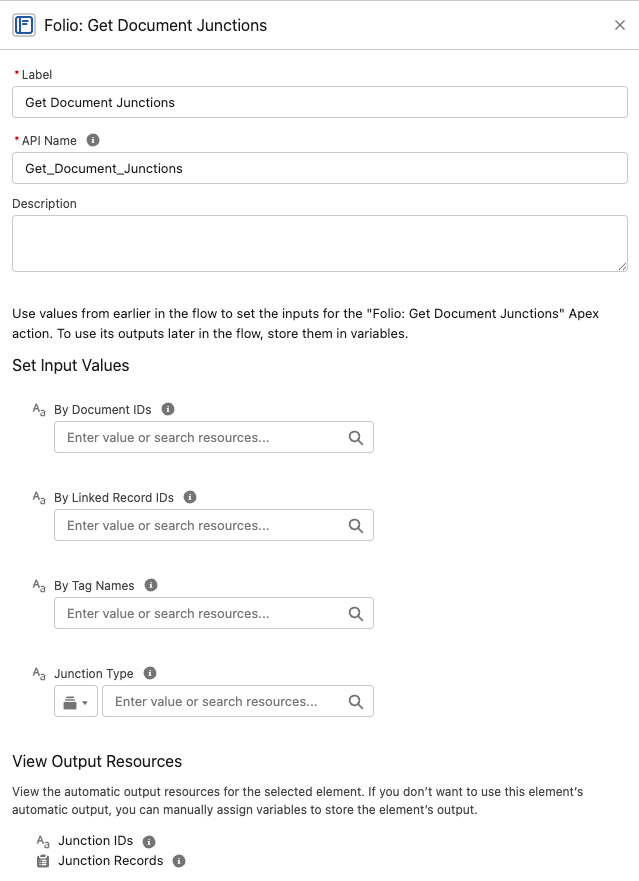
- `junctionType` (Text) — restrict to record links or Tag links.
- `byDocumentIds` (Text Collection)
- `byTagNames` (Text Collection)
- `byLinkedRecordIds` (Text Collection) — linked Salesforce record IDs.
**Outputs**
- `junctionIds` (Text Collection)
- `junctionRecords` (Record Collection of `folio__Junction__c`)
**Behavior notes**
- Filters are additive (AND-combined). Empty inputs are ignored.
- **Take `junctionRecords` to read or report on the Junctions**, and `junctionIds` when you only need to count them or pass IDs along.
- A Junction is either a record link **or** a Tag link, never both — `junctionType` is the cleanest way to get just one kind. See [Update Data in Bulk](/docs/admin/bulk-data-updates#junction-object) for the underlying fields.
- This is the action to pair with a standard Flow **Delete Records** element when you need to unlink a Tag or a record from a Document — feed it `junctionRecords`. See [Updating and deleting Folio data](#updating-and-deleting-folio-data).
### Get Document Junctions
Retrieve Junction records — both record links and Tag links — so a flow can inspect what a Document is connected to before acting on it.
**Inputs**
- `junctionType` (Text) — restrict to record links or Tag links.
- `byDocumentIds` (Text Collection)
- `byTagNames` (Text Collection)
- `byLinkedRecordIds` (Text Collection) — linked Salesforce record IDs.
**Outputs**
- `junctionIds` (Text Collection)
- `junctionRecords` (Record Collection of `folio__Junction__c`)
**Behavior notes**
- Filters are additive (AND-combined). Empty inputs are ignored.
- **Take `junctionRecords` to read or report on the Junctions**, and `junctionIds` when you only need to count them or pass IDs along.
- A Junction is either a record link **or** a Tag link, never both — `junctionType` is the cleanest way to get just one kind. See [Update Data in Bulk](/docs/admin/bulk-data-updates#junction-object) for the underlying fields.
- This is the action to pair with a standard Flow **Delete Records** element when you need to unlink a Tag or a record from a Document — feed it `junctionRecords`. See [Updating and deleting Folio data](#updating-and-deleting-folio-data).
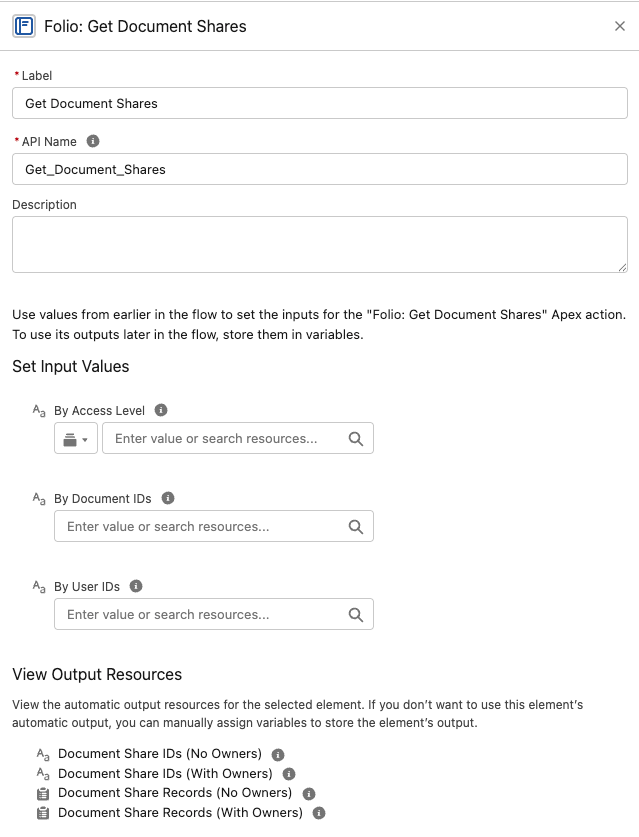
 ### Get Document Shares
Look up existing `folio__Document__Share` rows by user, by Document, by access level, or any combination.
**Inputs**
- `byUserIds` (Text Collection)
- `byDocumentIds` (Text Collection)
- `byAccessLevel` (Text) — `Read` or `Edit`
**Outputs — four of them, split two ways**
| Output | Contains |
| --- | --- |
| `documentShareIdsNoOwners` | ID collection, owner rows excluded |
| `documentShareRecordsNoOwners` | Record collection, owner rows excluded |
| `documentShareIdsWithOwners` | ID collection, owner rows included |
| `documentShareRecordsWithOwners` | Record collection, owner rows included |
**Pick the right output.** **With Owners** returns every matching share row including the owner's — use it for auditing and reporting. **No Owners** excludes rows whose `RowCause` is `Owner` — **use it for anything that changes access**, because owner share records cannot be edited or deleted by anyone. Most of the time, No Owners is the one you want.
Within each pair, use the **record** collection when feeding a Flow filter or an Update Records element, and the **ID** collection when you only need to count or pass IDs along.
**Behavior notes**
- Filters are AND-combined; if all are empty, returns empty.
- Excludes shares pointing at archived or template Documents.
### Get Document Shares
Look up existing `folio__Document__Share` rows by user, by Document, by access level, or any combination.
**Inputs**
- `byUserIds` (Text Collection)
- `byDocumentIds` (Text Collection)
- `byAccessLevel` (Text) — `Read` or `Edit`
**Outputs — four of them, split two ways**
| Output | Contains |
| --- | --- |
| `documentShareIdsNoOwners` | ID collection, owner rows excluded |
| `documentShareRecordsNoOwners` | Record collection, owner rows excluded |
| `documentShareIdsWithOwners` | ID collection, owner rows included |
| `documentShareRecordsWithOwners` | Record collection, owner rows included |
**Pick the right output.** **With Owners** returns every matching share row including the owner's — use it for auditing and reporting. **No Owners** excludes rows whose `RowCause` is `Owner` — **use it for anything that changes access**, because owner share records cannot be edited or deleted by anyone. Most of the time, No Owners is the one you want.
Within each pair, use the **record** collection when feeding a Flow filter or an Update Records element, and the **ID** collection when you only need to count or pass IDs along.
**Behavior notes**
- Filters are AND-combined; if all are empty, returns empty.
- Excludes shares pointing at archived or template Documents.
 ### Clone Document
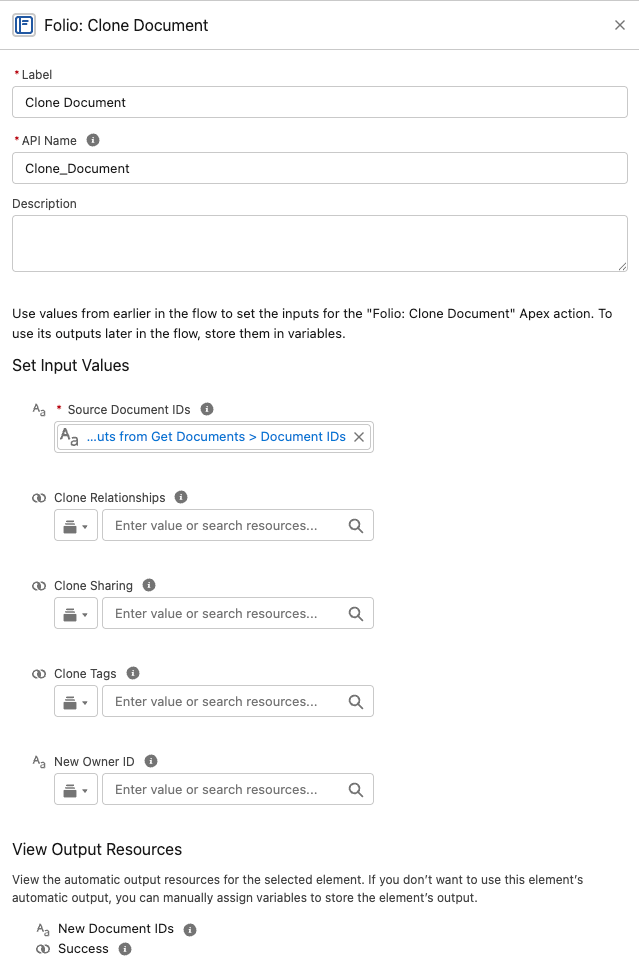
Create independent copies of one or more Documents, with optional carry-over of Tags, sharing, and linked records.
> **Every optional input defaults to `False`.** A bare **Clone Document** call copies the Document's *content only* — no Tags, no shares, no record links. This is the most common surprise with this action: admins expect a clone to be a full duplicate and get a bare copy instead. Set the flags you actually want.
**Inputs**
- **Source Document IDs** — `sourceDocumentIds` (Text Collection, required).
- **Clone Tags** — `cloneTags` (Boolean) — copies the source's Tags onto the clone. Default `False`.
- **Clone Sharing** — `cloneSharing` (Boolean) — copies Folio-created shares and native manual shares, each keeping its access level. **Owner and sharing-rule shares are not copied** — the platform recreates those for the clone automatically. Default `False`.
- **Clone Relationships** — `cloneRelationships` (Boolean) — copies the source's linked records onto the clone. Default `False`.
- **New Owner ID** — `newOwnerId` (Text, optional) — a single User ID; every clone gets this owner. If blank, each clone inherits its source Document's owner. The user must be active and hold a Folio permission set — **Folio Docs User** or **Folio Docs Administrator**.
**Outputs**
- `success` (Boolean) — only ever `true`; failures raise instead
- `newDocumentIds` (Text Collection)
**Behavior notes**
- Clones are titled `Copy of {original title}`.
- If more than one ID is passed in `sourceDocumentIds`, each source Document gets its own clone created in the same invocable run.
- **`newDocumentIds` comes back in the same order as the `sourceDocumentIds` input.** That positional guarantee is what makes this action chainable — you can correlate each clone with the Document it came from by index in a loop.
- **`sourceDocumentIds` accepts the `documentIds` output of [Folio: Get Documents](#get-documents) directly**, with no transformation step in between. It's the most natural pairing in Flow; see [Get Documents, then Clone them](/docs/admin/invocable-apex-use-cases#get-documents-then-clone-them).
- A `newOwnerId` assignment applies to all clones created in that invocable instance — this action does not support different owners for different clones in a single call.
- Source IDs and `newOwnerId` are validated; invalid inputs raise an error, so read the message from `{!$Flow.FaultMessage}` on a fault path.
- This action does not instantiate from a template — for that, use **Create Document from Template**.
### Clone Document
Create independent copies of one or more Documents, with optional carry-over of Tags, sharing, and linked records.
> **Every optional input defaults to `False`.** A bare **Clone Document** call copies the Document's *content only* — no Tags, no shares, no record links. This is the most common surprise with this action: admins expect a clone to be a full duplicate and get a bare copy instead. Set the flags you actually want.
**Inputs**
- **Source Document IDs** — `sourceDocumentIds` (Text Collection, required).
- **Clone Tags** — `cloneTags` (Boolean) — copies the source's Tags onto the clone. Default `False`.
- **Clone Sharing** — `cloneSharing` (Boolean) — copies Folio-created shares and native manual shares, each keeping its access level. **Owner and sharing-rule shares are not copied** — the platform recreates those for the clone automatically. Default `False`.
- **Clone Relationships** — `cloneRelationships` (Boolean) — copies the source's linked records onto the clone. Default `False`.
- **New Owner ID** — `newOwnerId` (Text, optional) — a single User ID; every clone gets this owner. If blank, each clone inherits its source Document's owner. The user must be active and hold a Folio permission set — **Folio Docs User** or **Folio Docs Administrator**.
**Outputs**
- `success` (Boolean) — only ever `true`; failures raise instead
- `newDocumentIds` (Text Collection)
**Behavior notes**
- Clones are titled `Copy of {original title}`.
- If more than one ID is passed in `sourceDocumentIds`, each source Document gets its own clone created in the same invocable run.
- **`newDocumentIds` comes back in the same order as the `sourceDocumentIds` input.** That positional guarantee is what makes this action chainable — you can correlate each clone with the Document it came from by index in a loop.
- **`sourceDocumentIds` accepts the `documentIds` output of [Folio: Get Documents](#get-documents) directly**, with no transformation step in between. It's the most natural pairing in Flow; see [Get Documents, then Clone them](/docs/admin/invocable-apex-use-cases#get-documents-then-clone-them).
- A `newOwnerId` assignment applies to all clones created in that invocable instance — this action does not support different owners for different clones in a single call.
- Source IDs and `newOwnerId` are validated; invalid inputs raise an error, so read the message from `{!$Flow.FaultMessage}` on a fault path.
- This action does not instantiate from a template — for that, use **Create Document from Template**.
 ### Create Document from Template
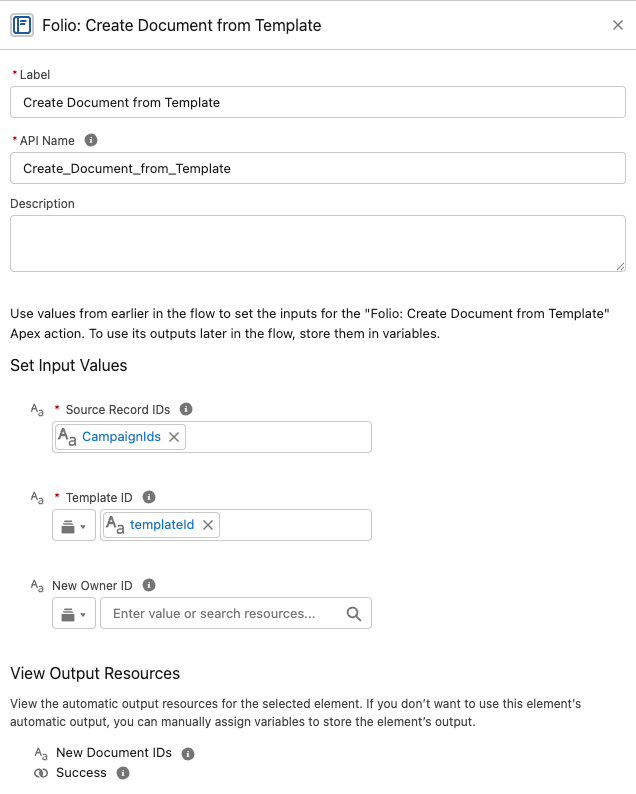
Instantiate one new Document per source record from a chosen template.
**Inputs**
- `sourceRecordIds` (Text Collection, required)
- `templateId` (Text, required)
- `newOwnerId` (Text, optional)
**Outputs**
- `success` (Boolean) — only ever `true`; failures raise instead
- `newDocumentIds` (Text Collection)
**Behavior notes**
- Resolves merge placeholders (Record Links, Live Fields, Salesforce components) against each source record at instantiation. See [Manage Templates](/docs/admin/admin-panel/templates) for the full merge-syntax walkthrough.
- Validates that each source record's object type matches the template's configured Source Object.
- Optionally assign the new Document to a specific `newOwnerId`. Defaults to the Owner of the Source Record. Each Document created in an invocable run assigns to the same `newOwnerId` if entered.
- Updates the new owner's **Last Viewed** tracker so the Documents surface naturally for them on the Folio Docs home page.
- **Related records and Tags on the Template carry over to each new Document and arrive locked**, exactly as they do when a user instantiates the Template in the editor. See [Related Records and Tags on a Template](/docs/admin/admin-panel/templates#related-records-and-tags-on-a-template).
### Create Document from Template
Instantiate one new Document per source record from a chosen template.
**Inputs**
- `sourceRecordIds` (Text Collection, required)
- `templateId` (Text, required)
- `newOwnerId` (Text, optional)
**Outputs**
- `success` (Boolean) — only ever `true`; failures raise instead
- `newDocumentIds` (Text Collection)
**Behavior notes**
- Resolves merge placeholders (Record Links, Live Fields, Salesforce components) against each source record at instantiation. See [Manage Templates](/docs/admin/admin-panel/templates) for the full merge-syntax walkthrough.
- Validates that each source record's object type matches the template's configured Source Object.
- Optionally assign the new Document to a specific `newOwnerId`. Defaults to the Owner of the Source Record. Each Document created in an invocable run assigns to the same `newOwnerId` if entered.
- Updates the new owner's **Last Viewed** tracker so the Documents surface naturally for them on the Folio Docs home page.
- **Related records and Tags on the Template carry over to each new Document and arrive locked**, exactly as they do when a user instantiates the Template in the editor. See [Related Records and Tags on a Template](/docs/admin/admin-panel/templates#related-records-and-tags-on-a-template).
 ### Transfer Document to Owner
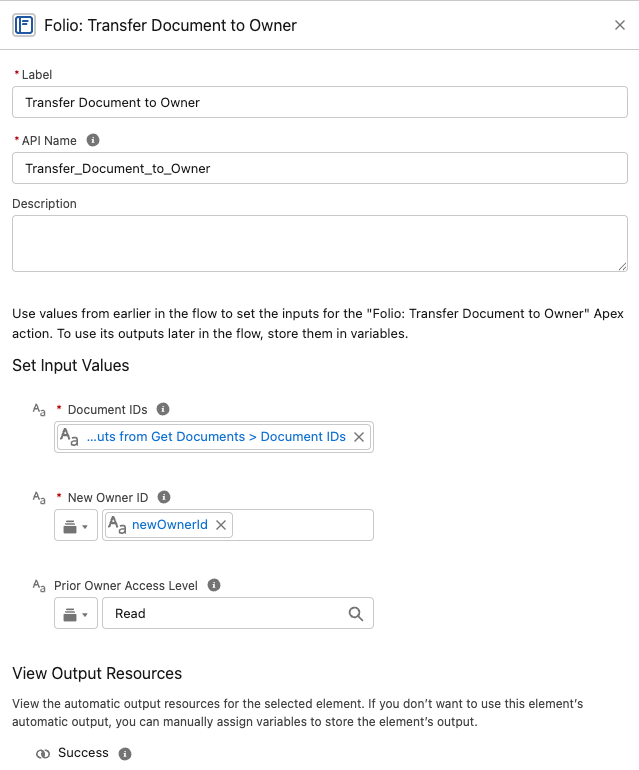
Bulk reassign Document ownership to a single new owner — a User or a Queue — optionally retaining access for prior owners.
**Inputs**
- `documentIds` (Text Collection, required)
- `newOwnerId` (Text, required) — a User ID or a Queue ID.
- `priorOwnerAccess` (Text, optional) — `None` (default), `Read`, or `Edit`.
**Outputs**
- `success` (Boolean) — only ever `true`; failures raise instead
**Behavior notes**
- All input Documents are transferred to the same `newOwnerId`.
- When `priorOwnerAccess` is `Read` or `Edit`, the prior owner is added as a manual share at that level.
- **A User given as `newOwnerId` must be active and be an [enabled Folio Docs user](/docs/getting-started/licenses-and-permissions#enabled-folio-docs-users) — holding either Folio Docs User or Folio Docs Administrator.** A departed or unlicensed user fails the whole call. `priorOwnerAccess` carries no such requirement — retaining access for a now-deactivated prior owner is fine.
- **A Queue given as `newOwnerId` must list Folio Document among its supported objects** — see [Queues](/docs/admin/admin-panel/settings#queues). Its members hold the owner's access for as long as they are in the Queue.
- Updates the new owner's **Last Viewed** tracker so the Documents surface naturally for them on the Folio Docs home page.
### Transfer Document to Owner
Bulk reassign Document ownership to a single new owner — a User or a Queue — optionally retaining access for prior owners.
**Inputs**
- `documentIds` (Text Collection, required)
- `newOwnerId` (Text, required) — a User ID or a Queue ID.
- `priorOwnerAccess` (Text, optional) — `None` (default), `Read`, or `Edit`.
**Outputs**
- `success` (Boolean) — only ever `true`; failures raise instead
**Behavior notes**
- All input Documents are transferred to the same `newOwnerId`.
- When `priorOwnerAccess` is `Read` or `Edit`, the prior owner is added as a manual share at that level.
- **A User given as `newOwnerId` must be active and be an [enabled Folio Docs user](/docs/getting-started/licenses-and-permissions#enabled-folio-docs-users) — holding either Folio Docs User or Folio Docs Administrator.** A departed or unlicensed user fails the whole call. `priorOwnerAccess` carries no such requirement — retaining access for a now-deactivated prior owner is fine.
- **A Queue given as `newOwnerId` must list Folio Document among its supported objects** — see [Queues](/docs/admin/admin-panel/settings#queues). Its members hold the owner's access for as long as they are in the Queue.
- Updates the new owner's **Last Viewed** tracker so the Documents surface naturally for them on the Folio Docs home page.
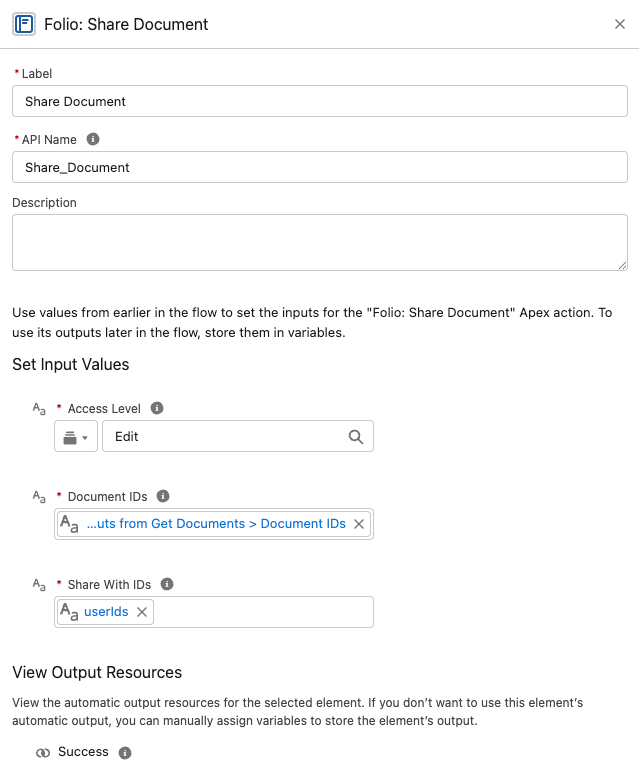
 ### Share Document
Grant Read or Edit access to Users, Queues, and/or Public Groups.
**Inputs**
- `documentIds` (Text Collection, required)
- `shareWithIds` (Text Collection, required) — User IDs, Queue IDs, and/or Public Group IDs.
- `accessLevel` (Text, required) — `Read` or `Edit`.
**Outputs**
- `success` (Boolean) — only ever `true`; failures raise instead
**Behavior notes**
- Additive — never downgrades existing higher access.
- Idempotent — re-sharing with an existing Document share row is skipped, so it's safe to call repeatedly without creating duplicate or noisy share rows.
- Every user in `shareWithIds` must be active and be an [enabled Folio Docs user](/docs/getting-started/licenses-and-permissions#enabled-folio-docs-users) — holding either Folio Docs User or Folio Docs Administrator. One stale ID fails the whole call.
- Groups must be Public Groups or Queues, not role groups or territory groups. A Queue must list **Folio Document** among its supported objects — see [Queues](/docs/admin/admin-panel/settings#queues).
### Share Document
Grant Read or Edit access to Users, Queues, and/or Public Groups.
**Inputs**
- `documentIds` (Text Collection, required)
- `shareWithIds` (Text Collection, required) — User IDs, Queue IDs, and/or Public Group IDs.
- `accessLevel` (Text, required) — `Read` or `Edit`.
**Outputs**
- `success` (Boolean) — only ever `true`; failures raise instead
**Behavior notes**
- Additive — never downgrades existing higher access.
- Idempotent — re-sharing with an existing Document share row is skipped, so it's safe to call repeatedly without creating duplicate or noisy share rows.
- Every user in `shareWithIds` must be active and be an [enabled Folio Docs user](/docs/getting-started/licenses-and-permissions#enabled-folio-docs-users) — holding either Folio Docs User or Folio Docs Administrator. One stale ID fails the whole call.
- Groups must be Public Groups or Queues, not role groups or territory groups. A Queue must list **Folio Document** among its supported objects — see [Queues](/docs/admin/admin-panel/settings#queues).
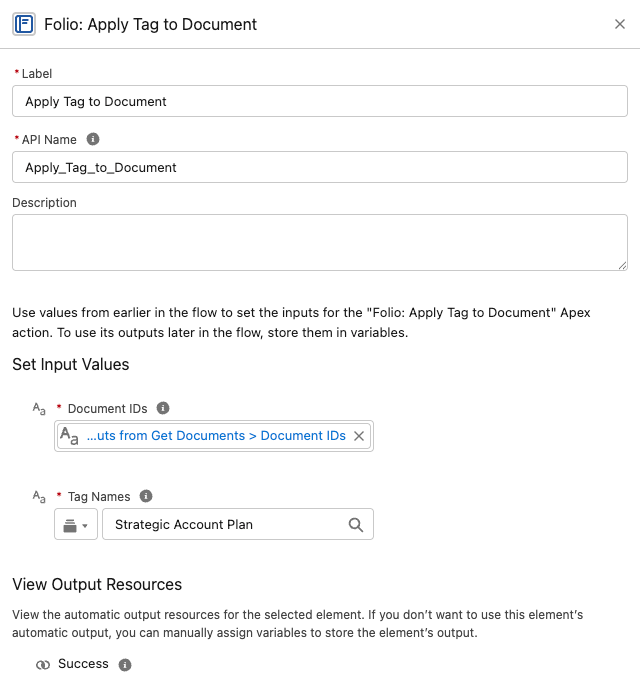
 ### Apply Tag to Document
Apply one or more Tags to one or more Documents.
**Inputs**
- `documentIds` (Text Collection, required)
- `tagNames` (**Text**, required) — a single comma-separated string, e.g. `Priority, Renewal, Q3`.
> **`tagNames` is a single Text value, not a Text Collection.** This is the one Folio input that breaks the collection convention — pass one comma-separated string rather than a Flow Text Collection. The comma is the separator, so spaces inside a name are part of it: `Strategic Account Plan` is one Tag.
**Outputs**
- `success` (Boolean) — only ever `true`; failures raise instead
**Behavior notes**
- Tags are matched by normalized name; existing Tags are reused.
- Missing Tags are created on the fly.
- Idempotent — re-running with the same inputs does not apply duplicate Tags to the Document.
### Apply Tag to Document
Apply one or more Tags to one or more Documents.
**Inputs**
- `documentIds` (Text Collection, required)
- `tagNames` (**Text**, required) — a single comma-separated string, e.g. `Priority, Renewal, Q3`.
> **`tagNames` is a single Text value, not a Text Collection.** This is the one Folio input that breaks the collection convention — pass one comma-separated string rather than a Flow Text Collection. The comma is the separator, so spaces inside a name are part of it: `Strategic Account Plan` is one Tag.
**Outputs**
- `success` (Boolean) — only ever `true`; failures raise instead
**Behavior notes**
- Tags are matched by normalized name; existing Tags are reused.
- Missing Tags are created on the fly.
- Idempotent — re-running with the same inputs does not apply duplicate Tags to the Document.
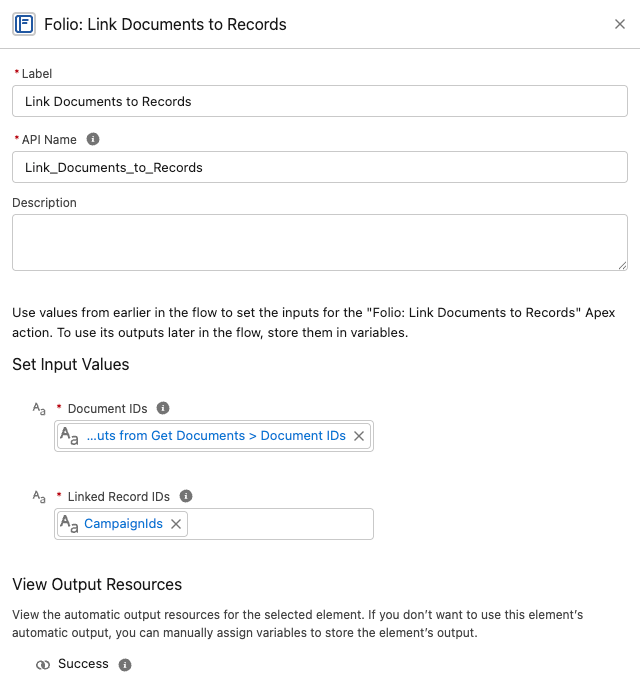
 ### Link Documents to Records
Create Junction links between Documents and any combination of Salesforce records.
**Inputs**
- `documentIds` (Text Collection, required)
- `recordIds` (Text Collection, required) — labeled **Linked Record IDs** in Flow. IDs of any object configured as a Linkable Object.
**Outputs**
- `success` (Boolean) — only ever `true`; failures raise instead
**Behavior notes**
- Creates a Junction from every Document in `documentIds` to every record in `recordIds`. For example, passing 3 Documents and 2 records produces 6 Junction links (every Document gets linked to every record).
- Object types are validated; passing a record whose object isn't on the [Object Linking Allowlist](/docs/admin/admin-panel/settings#object-linking-allowlist) will fail.
- Idempotent — existing links are de-duped, so reruns won't create duplicates.
### Link Documents to Records
Create Junction links between Documents and any combination of Salesforce records.
**Inputs**
- `documentIds` (Text Collection, required)
- `recordIds` (Text Collection, required) — labeled **Linked Record IDs** in Flow. IDs of any object configured as a Linkable Object.
**Outputs**
- `success` (Boolean) — only ever `true`; failures raise instead
**Behavior notes**
- Creates a Junction from every Document in `documentIds` to every record in `recordIds`. For example, passing 3 Documents and 2 records produces 6 Junction links (every Document gets linked to every record).
- Object types are validated; passing a record whose object isn't on the [Object Linking Allowlist](/docs/admin/admin-panel/settings#object-linking-allowlist) will fail.
- Idempotent — existing links are de-duped, so reruns won't create duplicates.
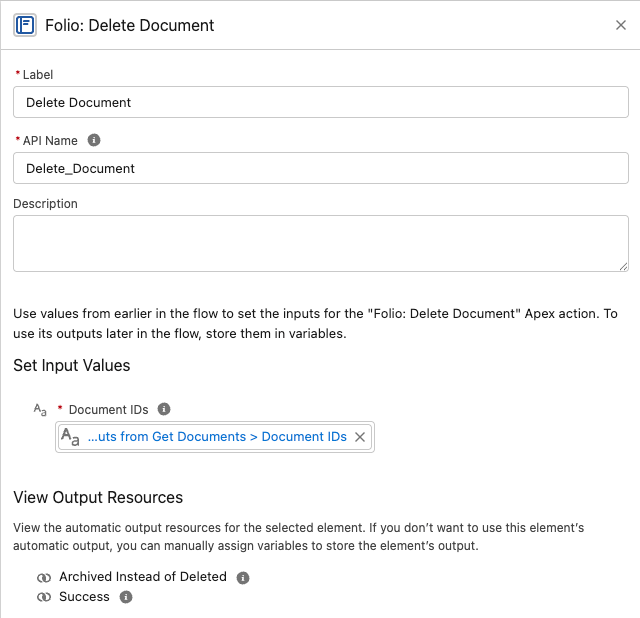
 ### Delete Document
Delete Documents together with their record links and Tags — or archive them, depending on your org's configuration.
**Inputs**
- `documentIds` (Text Collection, required)
**Outputs**
- `success` (Boolean) — only ever `true`; failures raise instead
- `archivedInsteadOfDeleted` (Boolean) — `true` when the org's hard-delete setting caused an archive rather than a delete
**Behavior notes**
- **Honors the [Delete Permissions](/docs/admin/admin-panel/settings#delete-permissions) setting.** When **Allow Document Hard Delete** is off — the default and the recommendation — this action sets the Document's **Archived** flag instead of deleting the record.
- When hard delete is enabled, the Document is removed along with its Junctions (both record links and Tag links).
- Respects the running user's access; a user who cannot delete a Document cannot delete it through this action either.
**Branch on `archivedInsteadOfDeleted` to tell the two outcomes apart.** Both an archive and a hard delete return `success = true`, so this Boolean is the only way a flow knows which happened — useful for logging, notifying, or taking a different follow-up step.
### Delete Document
Delete Documents together with their record links and Tags — or archive them, depending on your org's configuration.
**Inputs**
- `documentIds` (Text Collection, required)
**Outputs**
- `success` (Boolean) — only ever `true`; failures raise instead
- `archivedInsteadOfDeleted` (Boolean) — `true` when the org's hard-delete setting caused an archive rather than a delete
**Behavior notes**
- **Honors the [Delete Permissions](/docs/admin/admin-panel/settings#delete-permissions) setting.** When **Allow Document Hard Delete** is off — the default and the recommendation — this action sets the Document's **Archived** flag instead of deleting the record.
- When hard delete is enabled, the Document is removed along with its Junctions (both record links and Tag links).
- Respects the running user's access; a user who cannot delete a Document cannot delete it through this action either.
**Branch on `archivedInsteadOfDeleted` to tell the two outcomes apart.** Both an archive and a hard delete return `success = true`, so this Boolean is the only way a flow knows which happened — useful for logging, notifying, or taking a different follow-up step.
 > **Always delete Documents through this action rather than a raw Flow Delete Records element.** See [Updating and deleting Folio data](#updating-and-deleting-folio-data) for why.
### Refresh Document from Record Changes
Pushes a changed Salesforce record's state into every Document linked to it, and re-applies owner-based sharing.
**This is the one Folio invocable that runs on the linked record rather than on Documents**, so it belongs in a flow on your Account, Case, or custom object — not in a flow about Documents.
**Inputs**
- **Object for "Record (New State)"** and **Object for "Record (Prior State)"** — the triggering object, e.g. `Campaign`. Both are required; Flow needs the object type before it will accept the record variables below.
- **Record (New State)** — map `$Record`
- **Record (Prior State)** — map `$Record__Prior`
- **Record Was Deleted** (Boolean) — set to `True` in a **Deleted** flow
**Outputs**
- `success` (Boolean) — only ever `true`; failures raise instead
**Behavior notes**
- Add it to an **after-save record-triggered Flow** configured for **Updated** and/or **Deleted**.
- **Never trigger it on record creation.** *Created* and *Created and Updated* both break it — a brand-new record has no prior state, so **Record (Prior State)** has nothing to map and the action fails, taking the save with it:
> We can't save this record because the "Custom Object Record Publish to Folio Docs" process failed. Give your Salesforce admin these details. Missing required input parameter: recordPrior
That's the correct behavior rather than a bug to work around. Refreshing means pushing a change into Documents that already reference the record, and a record that has just been created can't be referenced anywhere yet. Use **Updated** and **Deleted** only.
- Changed fields are detected automatically — you don't specify which fields to watch.
- **It never fails the triggering save.** If the refresh can't complete, the record update it was triggered by still succeeds.
- Updates the record name on Record Links, and field values in Related Lists, Workbenches, Status Bars, Record Previews, and Kanban tiles.
- Re-applies owner-based sharing at the **Auto-Share Level** configured for that object when the record's owner has changed — including to queues, where members inherit access through standard group semantics.
- Not needed for **Account**, **Contact**, **Opportunity**, or **Case** — those four ship with packaged triggers and work with no setup.
> **Always delete Documents through this action rather than a raw Flow Delete Records element.** See [Updating and deleting Folio data](#updating-and-deleting-folio-data) for why.
### Refresh Document from Record Changes
Pushes a changed Salesforce record's state into every Document linked to it, and re-applies owner-based sharing.
**This is the one Folio invocable that runs on the linked record rather than on Documents**, so it belongs in a flow on your Account, Case, or custom object — not in a flow about Documents.
**Inputs**
- **Object for "Record (New State)"** and **Object for "Record (Prior State)"** — the triggering object, e.g. `Campaign`. Both are required; Flow needs the object type before it will accept the record variables below.
- **Record (New State)** — map `$Record`
- **Record (Prior State)** — map `$Record__Prior`
- **Record Was Deleted** (Boolean) — set to `True` in a **Deleted** flow
**Outputs**
- `success` (Boolean) — only ever `true`; failures raise instead
**Behavior notes**
- Add it to an **after-save record-triggered Flow** configured for **Updated** and/or **Deleted**.
- **Never trigger it on record creation.** *Created* and *Created and Updated* both break it — a brand-new record has no prior state, so **Record (Prior State)** has nothing to map and the action fails, taking the save with it:
> We can't save this record because the "Custom Object Record Publish to Folio Docs" process failed. Give your Salesforce admin these details. Missing required input parameter: recordPrior
That's the correct behavior rather than a bug to work around. Refreshing means pushing a change into Documents that already reference the record, and a record that has just been created can't be referenced anywhere yet. Use **Updated** and **Deleted** only.
- Changed fields are detected automatically — you don't specify which fields to watch.
- **It never fails the triggering save.** If the refresh can't complete, the record update it was triggered by still succeeds.
- Updates the record name on Record Links, and field values in Related Lists, Workbenches, Status Bars, Record Previews, and Kanban tiles.
- Re-applies owner-based sharing at the **Auto-Share Level** configured for that object when the record's owner has changed — including to queues, where members inherit access through standard group semantics.
- Not needed for **Account**, **Contact**, **Opportunity**, or **Case** — those four ship with packaged triggers and work with no setup.
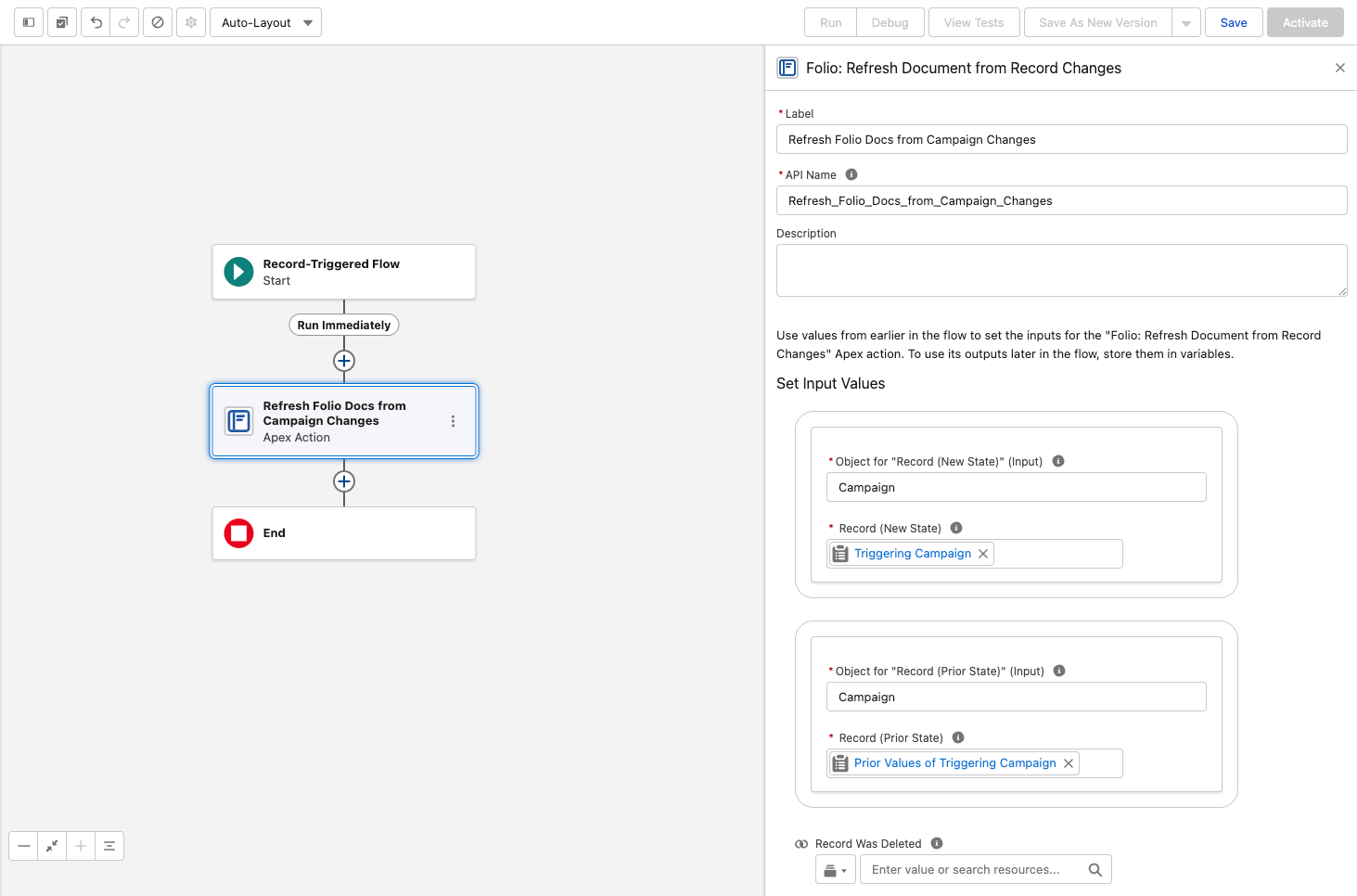 For the full picture of how real-time updates work and which objects warrant a flow, see [Set up Real-Time Updates](/docs/admin/real-time-updates).
## Updating and deleting Folio data
Folio deliberately does not ship invocables for every operation. For updates and deletes, standard Flow elements are the right tool — with two important exceptions.
### Document Shares
**There is no invocable for updating or deleting Document Shares.** Use **Folio: Get Document Shares** to retrieve the rows you want — take `documentShareRecordsNoOwners` — then standard Flow **Update Records** or **Delete Records** elements to change the access level or revoke access.
**Use the No Owners outputs for anything that changes access.** Owner share rows exist to represent ownership, are managed by the platform, and cannot be edited or deleted by anyone — including them in an Update or Delete Records element fails the step. The **With Owners** variants are there for auditing, where you want the complete picture.
### Junctions (record links and Tag links)
Use **Folio: Get Document Junctions**, then standard Flow **Update Records** or **Delete Records** elements.
In practice **Update** is rarely what you want — a Junction is little more than a pair of pointers. **Delete** is the operation that matters: deleting a Junction effectively unlinks a Tag or a record from the Document.
### Documents
**Always use Folio: Delete Document. Never use a raw Flow Delete Records element on `folio__Document__c`.**
The invocable removes all linked related records and honors the hard-delete setting, archiving instead of deleting when hard delete is disabled. A raw delete does neither: it **orphans the Document's Junctions** — leaving Tag and record links pointing at nothing — and **ignores the archive policy** entirely, permanently destroying content your org's configuration says should be recoverable.
If you see a **Deleted** bar on the [Documents Archived or Deleted](/docs/admin/admin-panel/dashboard#documents-archived-or-deleted) chart in an org where hard delete is disabled, a raw delete is the likely cause.
For bulk operations outside of Flow, see [Update Data in Bulk](/docs/admin/bulk-data-updates).
## Where to go next
- For chaining recipes (Get → Share, Get → Tag, Clone → Share, etc.) and end-to-end business scenarios, see [Review Invocable Apex Use Cases](/docs/admin/invocable-apex-use-cases).
- For failure categories, fault-path design, debugging checklists, and idempotency rules, see [Handle Invocable Apex Errors](/docs/admin/invocable-apex-errors).
## Best practices and guardrails
- **Capture the new Document Id** from **Create Document from Template** or **Clone Document** so you can chain follow-up actions (apply a Tag, share with a group, link to additional records) in the same flow.
- **Combine actions.** A single flow can create from a template → apply a Tag → share with a group → link to a related record, all in one run.
- **Always supply at least one filter to Get Documents.** Returning the entire org is intentionally not allowed — protect your bulkification quotas by being specific.
- **Delete Documents only through Folio: Delete Document.** A raw Flow Delete Records element orphans Junctions and ignores the archive policy — see [Updating and deleting Folio data](#updating-and-deleting-folio-data).
- **Use Refresh Document from Record Changes for any object beyond the built-in four.** Account, Contact, Opportunity, and Case ship with packaged triggers and need no setup; add a record-triggered flow calling this action to extend the same real-time updates and owner re-sharing to every other object (see [Set up Real-Time Updates](/docs/admin/real-time-updates)).
- **Tag automatically created Documents** (e.g., `Auto-created`, `Renewal Draft`, `Handoff`) so users can filter and audit them on the Folio Docs home page.
- **Set a clear ownership policy** before turning on auto-creation — decide who should own auto-created Documents and pass `newOwnerId` accordingly to avoid orphaned content.
## FAQ
For the full picture of how real-time updates work and which objects warrant a flow, see [Set up Real-Time Updates](/docs/admin/real-time-updates).
## Updating and deleting Folio data
Folio deliberately does not ship invocables for every operation. For updates and deletes, standard Flow elements are the right tool — with two important exceptions.
### Document Shares
**There is no invocable for updating or deleting Document Shares.** Use **Folio: Get Document Shares** to retrieve the rows you want — take `documentShareRecordsNoOwners` — then standard Flow **Update Records** or **Delete Records** elements to change the access level or revoke access.
**Use the No Owners outputs for anything that changes access.** Owner share rows exist to represent ownership, are managed by the platform, and cannot be edited or deleted by anyone — including them in an Update or Delete Records element fails the step. The **With Owners** variants are there for auditing, where you want the complete picture.
### Junctions (record links and Tag links)
Use **Folio: Get Document Junctions**, then standard Flow **Update Records** or **Delete Records** elements.
In practice **Update** is rarely what you want — a Junction is little more than a pair of pointers. **Delete** is the operation that matters: deleting a Junction effectively unlinks a Tag or a record from the Document.
### Documents
**Always use Folio: Delete Document. Never use a raw Flow Delete Records element on `folio__Document__c`.**
The invocable removes all linked related records and honors the hard-delete setting, archiving instead of deleting when hard delete is disabled. A raw delete does neither: it **orphans the Document's Junctions** — leaving Tag and record links pointing at nothing — and **ignores the archive policy** entirely, permanently destroying content your org's configuration says should be recoverable.
If you see a **Deleted** bar on the [Documents Archived or Deleted](/docs/admin/admin-panel/dashboard#documents-archived-or-deleted) chart in an org where hard delete is disabled, a raw delete is the likely cause.
For bulk operations outside of Flow, see [Update Data in Bulk](/docs/admin/bulk-data-updates).
## Where to go next
- For chaining recipes (Get → Share, Get → Tag, Clone → Share, etc.) and end-to-end business scenarios, see [Review Invocable Apex Use Cases](/docs/admin/invocable-apex-use-cases).
- For failure categories, fault-path design, debugging checklists, and idempotency rules, see [Handle Invocable Apex Errors](/docs/admin/invocable-apex-errors).
## Best practices and guardrails
- **Capture the new Document Id** from **Create Document from Template** or **Clone Document** so you can chain follow-up actions (apply a Tag, share with a group, link to additional records) in the same flow.
- **Combine actions.** A single flow can create from a template → apply a Tag → share with a group → link to a related record, all in one run.
- **Always supply at least one filter to Get Documents.** Returning the entire org is intentionally not allowed — protect your bulkification quotas by being specific.
- **Delete Documents only through Folio: Delete Document.** A raw Flow Delete Records element orphans Junctions and ignores the archive policy — see [Updating and deleting Folio data](#updating-and-deleting-folio-data).
- **Use Refresh Document from Record Changes for any object beyond the built-in four.** Account, Contact, Opportunity, and Case ship with packaged triggers and need no setup; add a record-triggered flow calling this action to extend the same real-time updates and owner re-sharing to every other object (see [Set up Real-Time Updates](/docs/admin/real-time-updates)).
- **Tag automatically created Documents** (e.g., `Auto-created`, `Renewal Draft`, `Handoff`) so users can filter and audit them on the Folio Docs home page.
- **Set a clear ownership policy** before turning on auto-creation — decide who should own auto-created Documents and pass `newOwnerId` accordingly to avoid orphaned content.
## FAQ
Do these actions run in the running user's context, or as a system user?
Whichever context the calling flow is configured for. By default, flows run as the running user, and Folio invocables respect that user's Salesforce sharing, FLS, and Folio permissions. If the flow is set to system context (with or without sharing), Folio invocables inherit that elevated access. Choose the flow configuration that matches your org's security model.
What happens if I pass an empty Text Collection?
The action treats it as "no filter" (for Get actions) or as "nothing to do" (for write actions). It is not an error, but downstream Decision nodes should branch on emptiness so the flow logs are explicit.
Can I share with a Salesforce Queue or Role?
**A Queue, yes.** Pass its ID in `shareWithIds` alongside any User or Public Group IDs. The Queue must list **Folio Document** among its supported objects first — see [Queues](/docs/admin/admin-panel/settings#queues). Queues also receive Documents automatically when they own a linked record and the object's Auto-Share Level is **Read** or **Edit**.
**A Role, no.** Roles, Role-and-Subordinates groups, and Customer Portal groups are rejected with an error naming the offending group, and a Role cannot receive a share through auto-share either. Use a Public Group instead.
Will Share Document overwrite an existing Edit share with Read?
No — sharing is additive and never downgrades. To remove or downgrade access, use a separate revocation path: call **Get Document Shares**, take `documentShareRecordsNoOwners`, and use a standard Flow **Update Records** element to change `AccessLevel` (or **Delete Records** to revoke access entirely). See [Updating and deleting Folio data](#updating-and-deleting-folio-data).
How do I share with a Salesforce Account/Opportunity/Case Team?
Use the [**Automatic Team Sharing**](/docs/admin/admin-panel/settings#automatic-team-sharing) settings in the Folio Admin app to automatically share Documents with the Team Members of linked Accounts, Opportunities, and Cases. For any other sharing automation needs, use the **Share Document** invocable action.
Can Get Documents return archived Documents?
No — both Get actions exclude archived and template Documents by design. To work with archived Documents, use a **Get Records** element directly on `folio__Document__c` filtered by `folio__Is_Archived__c = true` **and** `folio__Document_Type__c = 'Document'` (subject to user access). Without the second filter you'll pull archived templates in alongside archived Documents.
Why do most inputs use Text Collections of IDs instead of Record Collections?
IDs are stored as text in Flow, and Text Collections accept IDs from any source — Get actions, Get Records loops, manually-entered constants. Record Collections are returned where you need field values for downstream decisions.
Does Refresh Document from Record Changes remove the prior owner's access?
No — it is additive. It grants the new owner access at the configured Auto-Share Level but never strips the prior owner's. If you need to remove the prior owner, do that explicitly via separate logic.
How do I delete or downgrade a Document Share?
There is no invocable for it. Use **Get Document Shares**, take `documentShareRecordsNoOwners`, then a standard Flow **Update Records** or **Delete Records** element — see [Updating and deleting Folio data](#updating-and-deleting-folio-data).
Are Folio invocables bulkified?
Yes — they're designed to accept collections and process them in bulk. Keep them outside Flow Loops and pass the whole collection in one call. For single-record use, wrap the one record ID in a Text Collection of one and pass that — the inputs only accept Text Collections, but a collection of one is fine.
Where do I find the in-org help text and parameter labels?
Inside Flow Builder, after adding the action element, expand the input/output panels to see the latest authoritative description for each parameter as it ships.
**Related:** [Review Invocable Apex Use Cases](/docs/admin/invocable-apex-use-cases) · [Handle Invocable Apex Errors](/docs/admin/invocable-apex-errors) · [Manage Templates](/docs/admin/admin-panel/templates) · [Use the Admin Panel](/docs/admin/admin-panel) · [Set up Real-Time Updates](/docs/admin/real-time-updates)